EasyManua.ls Logo

Veon SAT101 - Remote Control Operation; Understanding Remote Buttons

Veon SAT101
28 pages
Print Icon
To Next Page IconTo Next Page
To Previous Page IconTo Previous Page
Loading...
EXIT
INFO
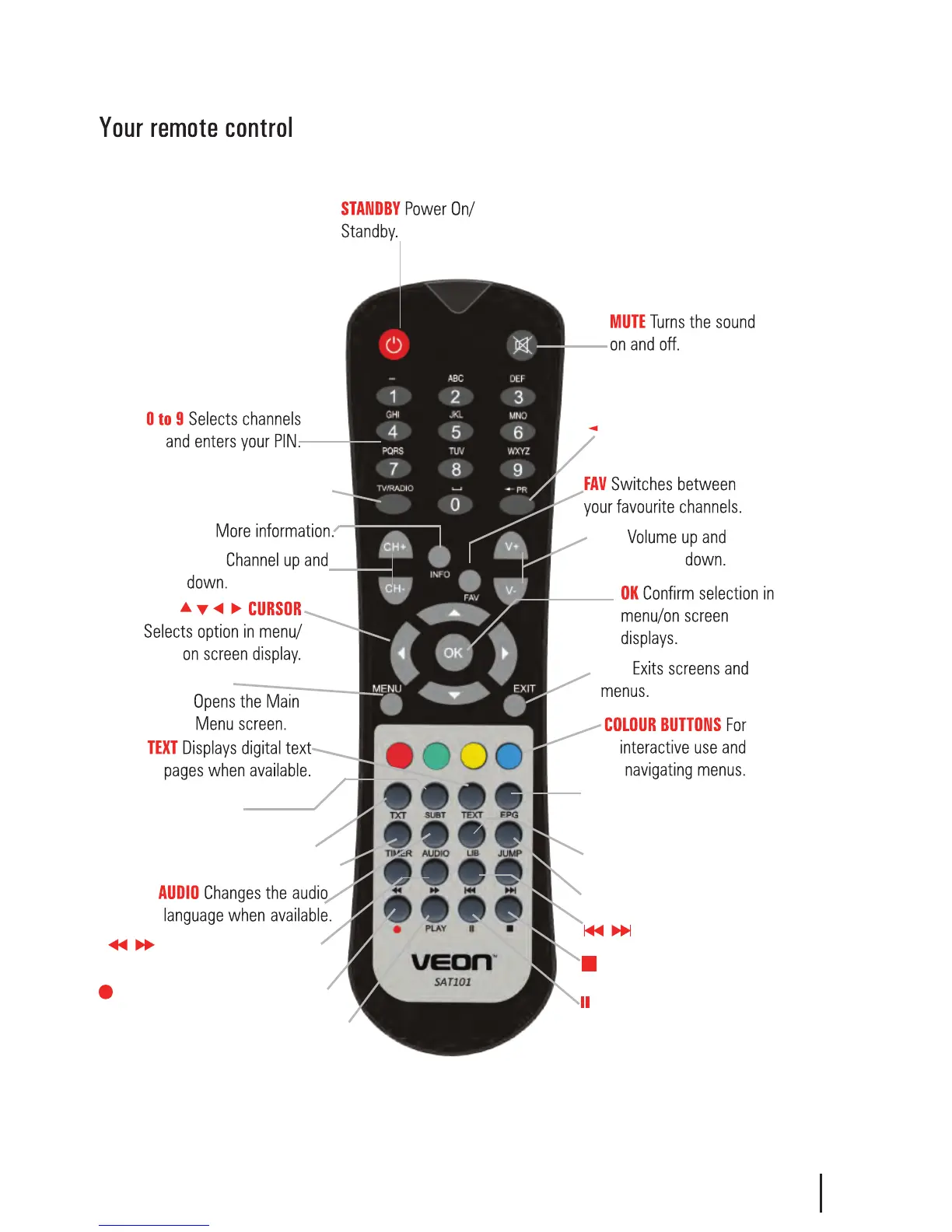
TV/RADIO Switches between
TV and Radio.
CH +/-
V +/-
TXT Brings up Teletext.
EPG Electronic Programme
Guide, open programme
guide window.
Menu
Pause Pause playback.
Record Record a programme.
Stop
LIB
Beginning/End
Stops playback
Library, Displays
recorded programmes list.
Fast Forward/Rewind
playback.
5
SUBT Displays subtitles
whe available.
PLAY Plays your recordings.
TIMER Displays the wakeup timer.
JUMP Enter a time to jump to
PR
-
Brings up the Program
Recall list
Holding the INFO
button for 3 sec
displays the
Version page.
Holding the Library
button for 3 sec
displays the record
booking list.