SETUP
Device Features
M425 I
NSTALLATION GUIDE 15
Device Features
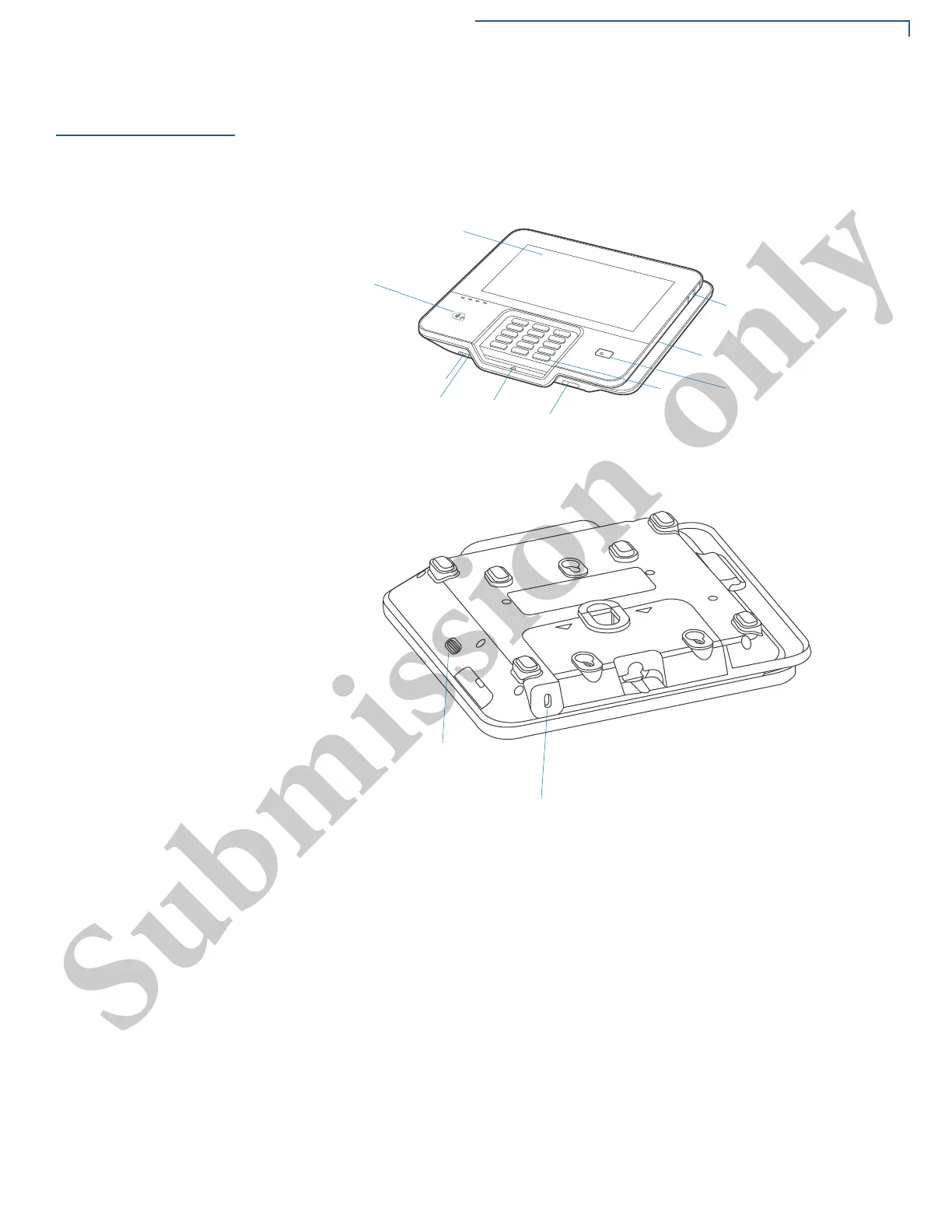
Familiarize yourself with the device features before continuing with the installation
process:
Figure 2 M425 Features
Front Panel
The front panel offers the following features:
• Touch Screen Display - The Verifone M425 device has a colored touch
screen Display.
• Smart Card Reader - A smart card reader is built into the front of the device to
process smart card-based debit or credit transactions. For directions on how
to use a smart card, see Using the Smart Card Reader.
• Magnetic Card Reader - A magnetic card reader is built into the device for
performing debit or credit card transactions. The card can be swiped in either
direction. To ensure a proper read of the magnetic swipe card, insert the
magnetic card from the side of the device as shown in Figure 11.
-!'.%4)##!2$2%!$%2
,%$34/).$)#!4%
-322%!$9
4%,#/349,%
+%90!$
3-!24#!2$
2%!$%2
4/5#(3#2%%.
$)30,!9
#4,30!9-%.4
:/.%
!5$)/*!#+
30%!+%2
"!2#/$%
3#!..%2
-)#2/0(/.%
+ENSINGTON,OCK
0OWER/./&&



 To Next Page