PERFORMING DOWNLOADS
Set Up the Download Environment
108 V
X
810 REFERENCE GUIDE
Cable Connection
for Direct
Downloads
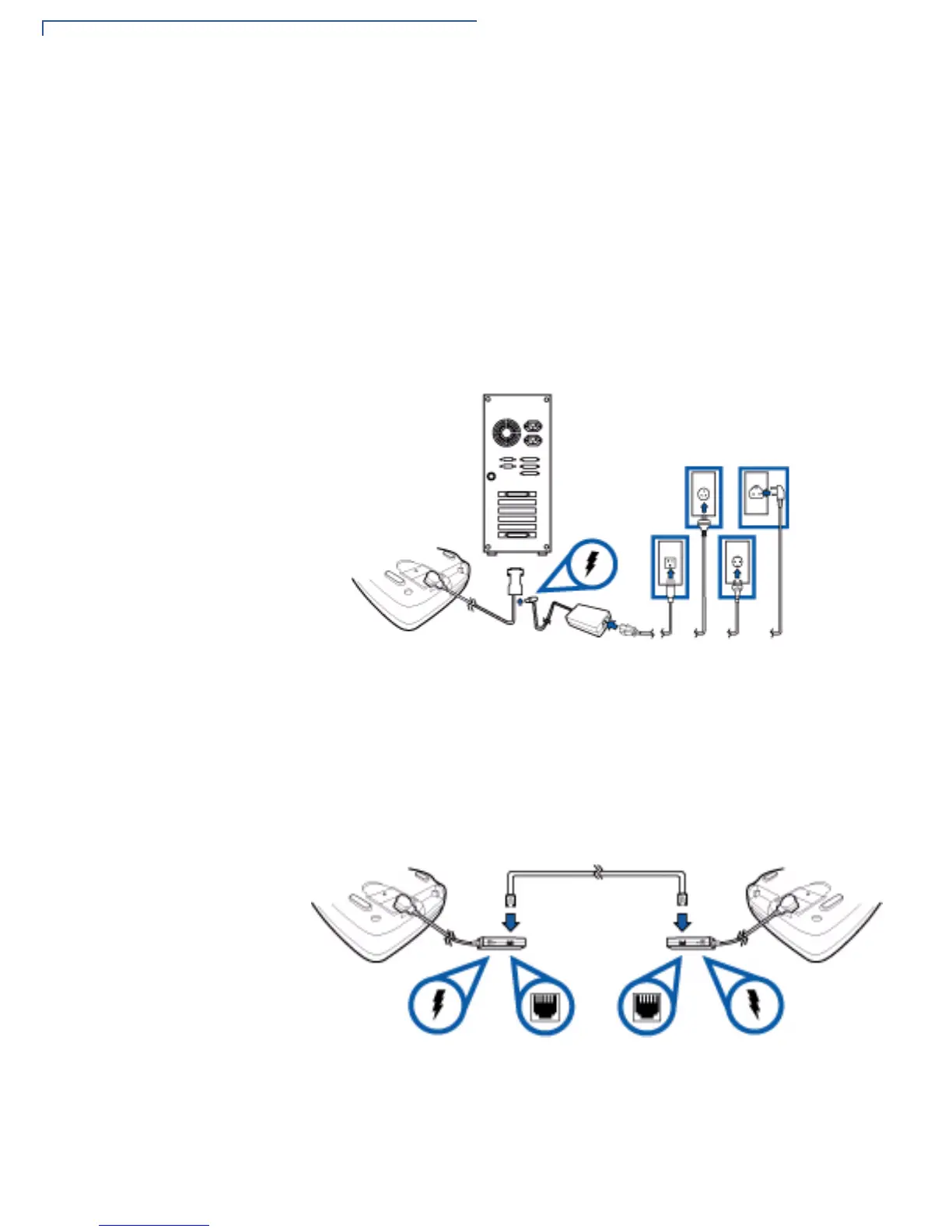
A special dongle cable, VPN 08362-01-R, is provided for direct downloads. This is
the generic cable for all RS-232-based hosts.
The following steps describe how to establish the cable link between the sending
host computer and the receiving V
x
810 device using the special dongle cable:
1 Connect the 14-pin header end of the cable to the V
x
810.
2 Connect the female DB-9 connector end of the cable to the RS-232 serial port
of the host computer.
3 Connect an external power brick to the DC jack provided on the DB-9
connector housing.
Figure 25 Serial Cable Connection with Multi-Port Adapter
Cable Connection
for Back-to-Back
Application
Downloads
To prepare for a back-to-back application download:
1 Connect a MOD10 cable (P/N 05651-XX) between the RS-232 serial ports of
the devices using a UART Dongle connected to each device.
2 Power up both devices.
Figure 26 MOD10 Cable Connection Between Two V
x
810 Devices



 To Next Page