Access Point Setup
29
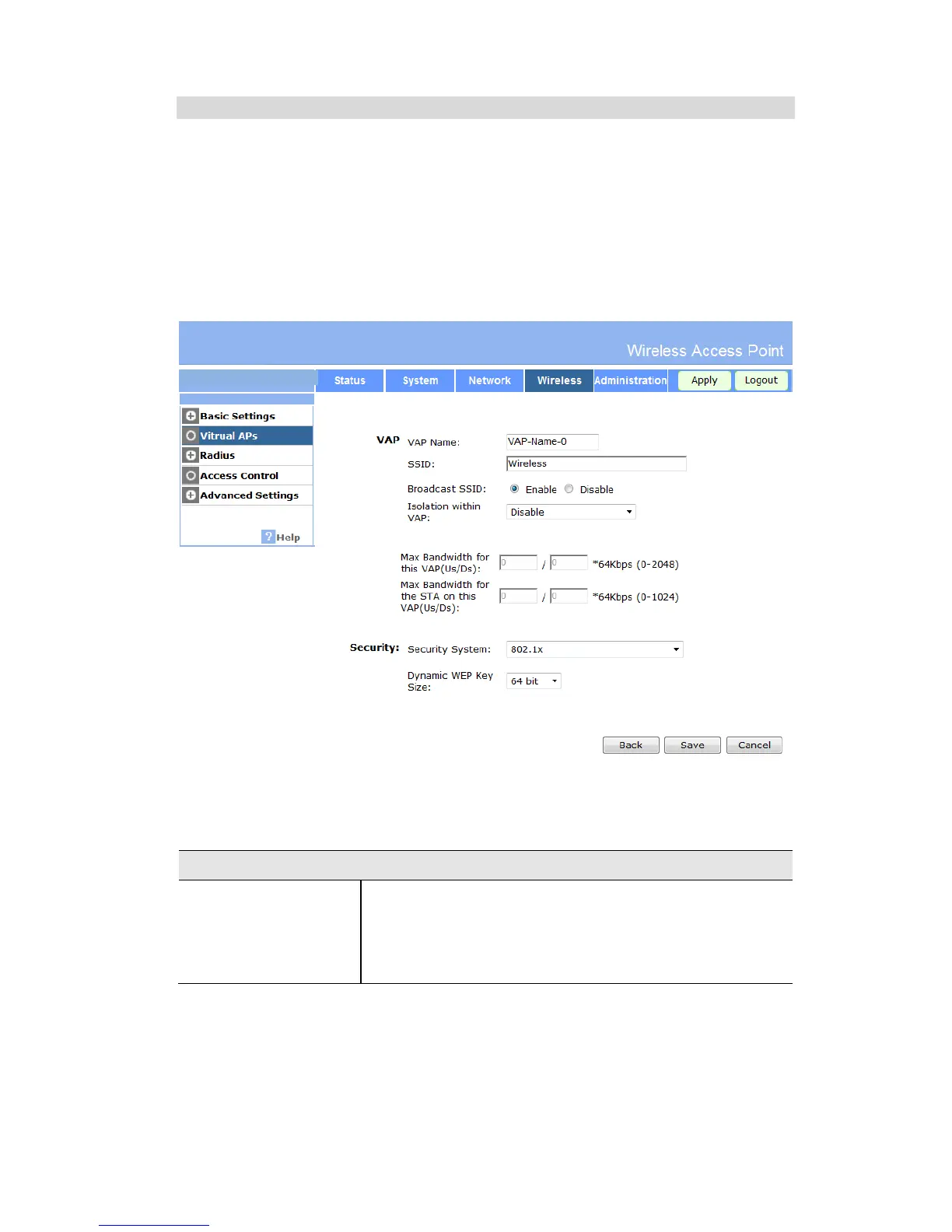
Security Settings - 802.1x
This uses the 802.1x standard for client authentication, and WEP for data encryption. If this
option is selected:
x This Access Point must have a "client login" on the Radius Server.
x Each user must have a "user login" on the Radius Server. Normally, a Certificate is used to
authenticate each user. See Chapter4 for details of user configuration.
x Each user's wireless client must support 802.1x.
x All data transmission is encrypted using the WEP standard. You only have to select the
WEP key size; the WEP key is automatically generated.
Figure 20: 802.1x Wireless Security Screen
Data - 802.1x Screen
Select the desired option:
x 64 Bit - Keys are 10 Hex (5 ASCII) characters.
x 128 Bit - Keys are 26 Hex (13 ASCII) characters.
x 152 Bit - Keys are 32 Hex (16 ASCII) characters.


 To Next Page