To change the list of Trusted Stations (Add, Edit, or Delete a Wireless
Station or Stations), click this button. You will then see the Trusted
Wireless Stations screen, described below.
To upload a list of Trusted Stations from a file on your PC, click this
button.
To download the current list of Trusted Stations from the Access Point
to a file on your PC, click this button.
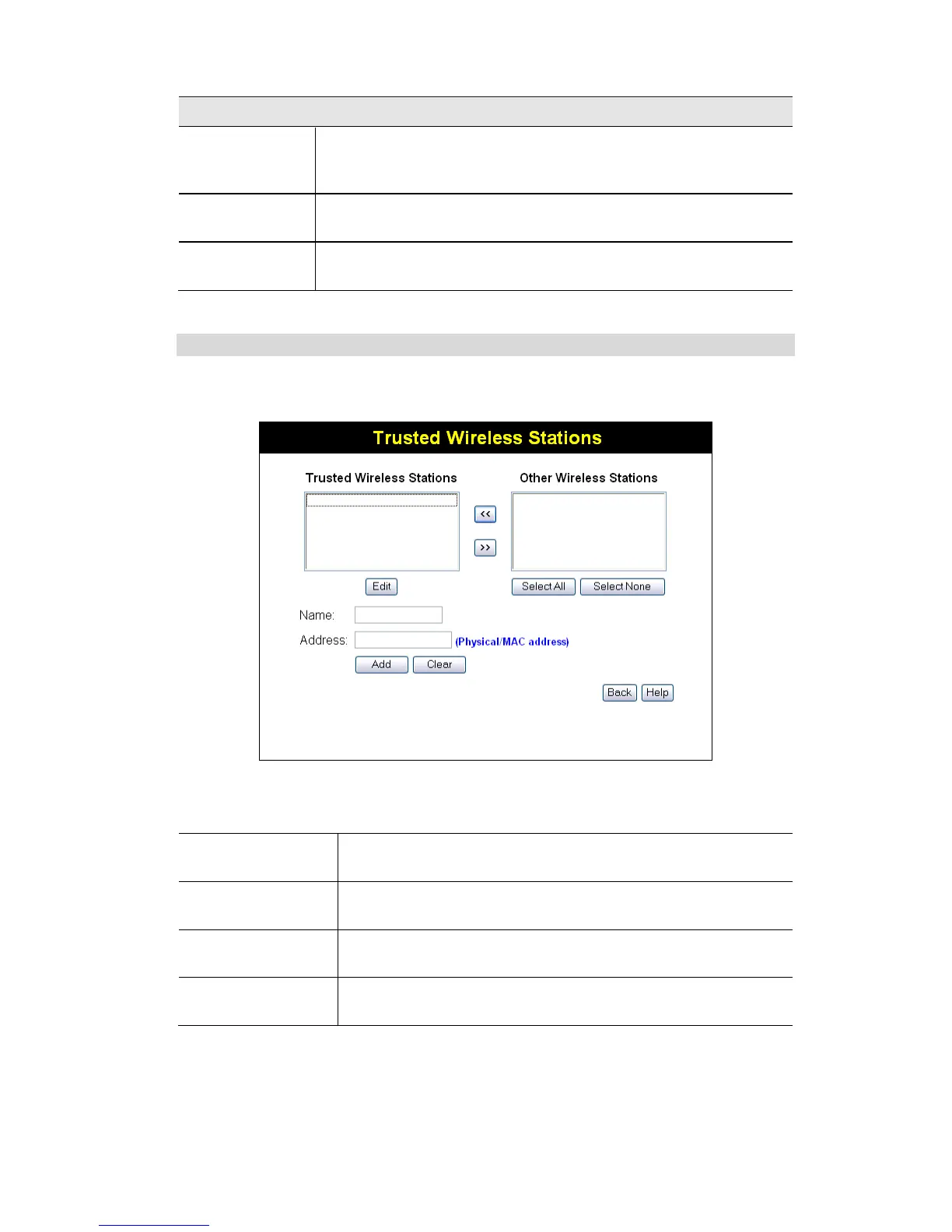
Trusted Wireless Stations
To change the list of trusted wireless stations, use the Modify List button on the Access Control
screen. You will see a screen like the sample below.
Figure 23: Trusted Wireless Stations
Data - Trusted Wireless Stations
Trusted Wireless
Stations
This lists any Wireless Stations which you have designated as
“Trusted”.
This list any Wireless Stations detected by the Access Point, which
you have not designated as "Trusted".
The name assigned to the Trusted Wireless Station. Use this when
adding or editing a Trusted Station.
The MAC (physical) address of the Trusted Wireless Station. Use
this when adding or editing a Trusted Station.


 To Next Page