EasyManua.ls Logo

versa VX-AP310N - Page 71

versa VX-AP310N
103 pages
Print Icon
To Next Page IconTo Next Page
To Previous Page IconTo Previous Page
Loading...
Access Point Management
67
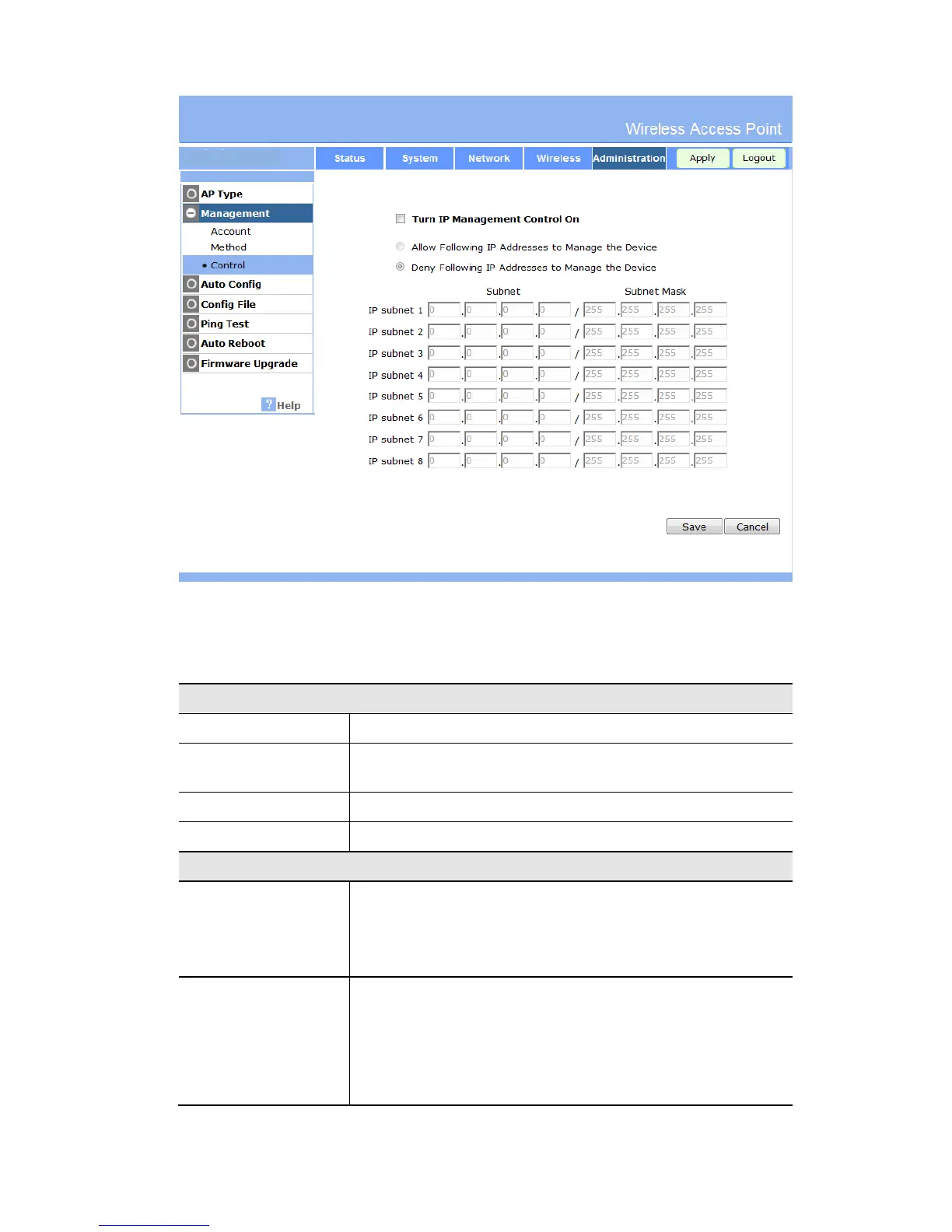
Figure 57: Management Screen
Data - Management Screen
Account
Admin User Name
The name for login the Device Web.
Change Admin
Password
If checked, You can change the login password. The default
password is password.
New Password
Input the new password.
Re-enter to Confirm
Avoid the error. Re-enter the new password.
Method
Enable Wireless Web
Access
If enabled, the device will allow wireless client access the Device
Web by wireless.
If disabled, the device will only allow Ethernet client access the
Device Web.
Enable HTTP Admin
Connections.
HTTP Port Number
If enabled. The device will allow user via it by HTTP method.
If disabled. The device will refuse user via it by HTTP method.
Input the desired HTTP port. The default port is 80.

Table of Contents