6.3 Terminal Block Communication
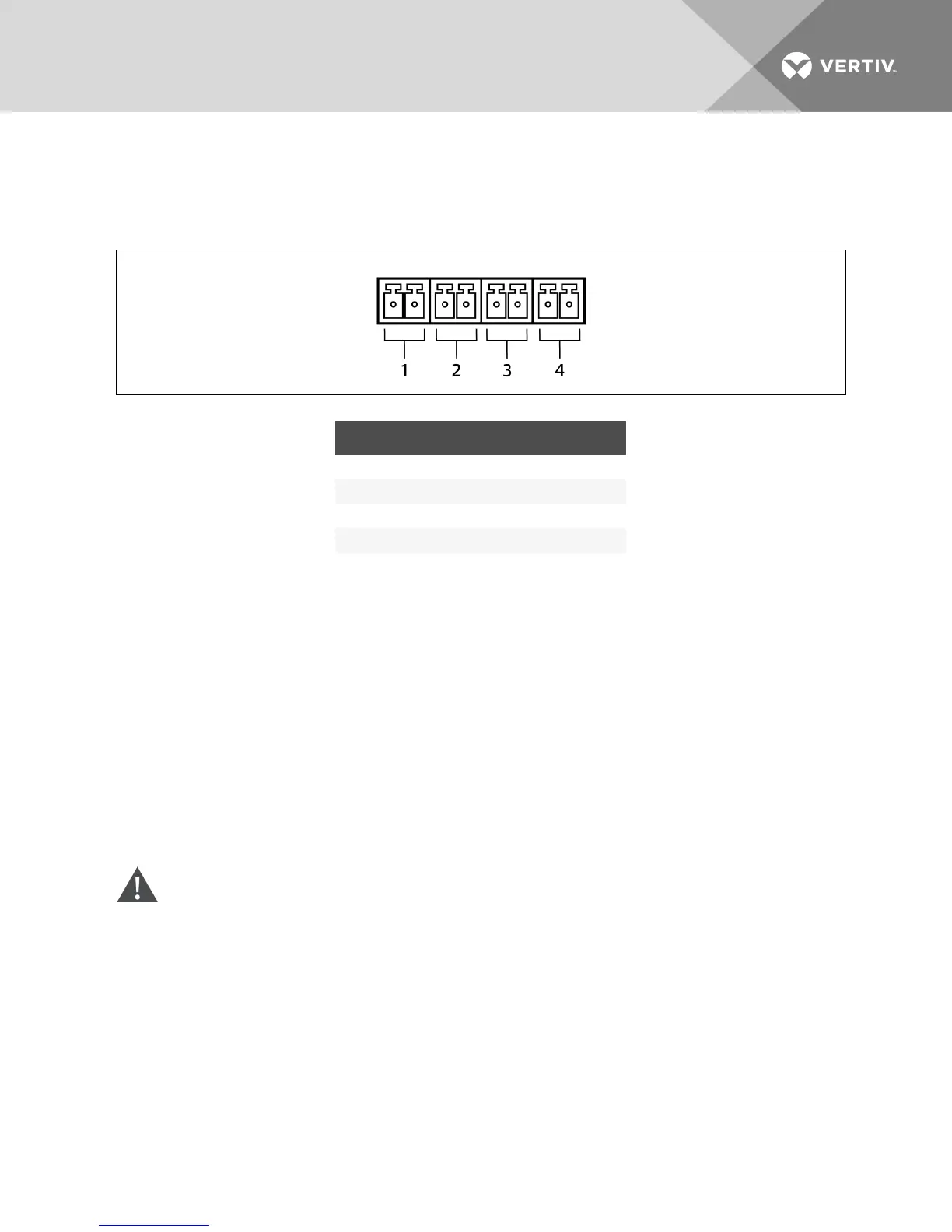
The Terminal Block includes eight pins, as shown the figure
Figure 6.1 Terminal-block communication pin layout
NO. DESCRIPTION
1 Low battery warning
2 On-battery warning
3 Any mode shutdown
4 Battery mode shutdown
6.3.1 Any Mode Shutdown
The purpose of Any Mode Shutdown is to shut down the UPS output by turning Off the rectifier, inverter
and static switch so that there is no power to the loads.
Any Mode Shutdown can be operated locally or remotely:
• Local Any Mode Shutdown can be performed by shorting the pins in terminal 3.
• Remote Any Mode Shutdown can be performed using a switch mounted at a remote location
and connected to the pins in terminal 3.
NOTE: Remote Power Off will be performed either by NO or NC contact of Any Mode Shutdown,
depending on the settings in the configuration program.
A current-limited source for this optocoupler (+12VDC, 50mA) will be available from the UPS.
The connection to the UPS for remote connection will be via terminal block connector.
Any Mode Shutdown wiring must conform to all national, regional and local wiring regulations.
WARNING! When the Auto-Enable output option is selected and the UPS output is disabled
using Any Mode Shutdown, the GXT4 output can turn On automatically and without warning if
the connection is changed.
Vertiv | Liebert GXT4 Installer/User Guide | 45







 To Next Page