112 Installation
Vertiv™ | Liebert® PSI5 120V Input / 120V Output & 208V lnput / 208V Output Installer/User Guide
Tower Installation
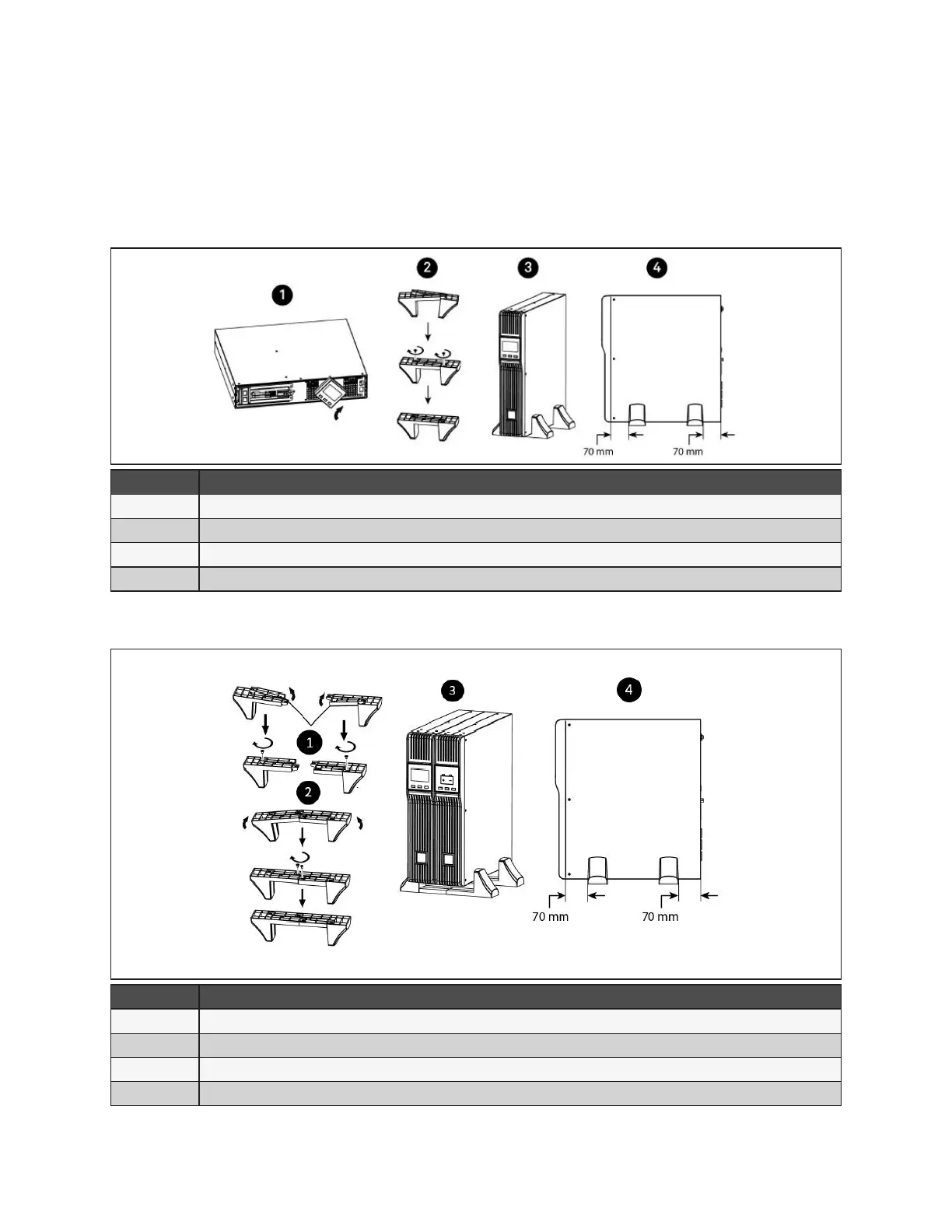
When using the UPS in a tower conguration, see Figure 2-1 below. If you have an external battery, see
Figure 2-2.
Figure 2-1 Attaching stands to the UPS
ITEM DESCRIPTION
1 Rotate the display by pulling out, and turning it clockwise until it is seated in the proper orientation.
2 Connect the two halves of the stand together.
3 Place the UPS in the stands.
4 Make sure that the stands are installed 70mm (2.76 in.) form the edge of the unit.
Figure 2-2 Attaching stands to the UPS and external battery
ITEM DESCRIPTION
1 Insert a spacer on each stand and install the securing screws.
2 Connect the two halves of the stand together and install the securing screws
3 Place the UPS and external battery pack in the stands (rotate the display on the UPS if desired, see Figure 2-1)
4 Make sure that the stands are installed 70 mm (2.76 in.) from the edge of the unit.










 To Next Page