Chapter 3 Web Interface of RDU501
RDU501 Intelligent Monitoring Unit User Manual
1. Video device management
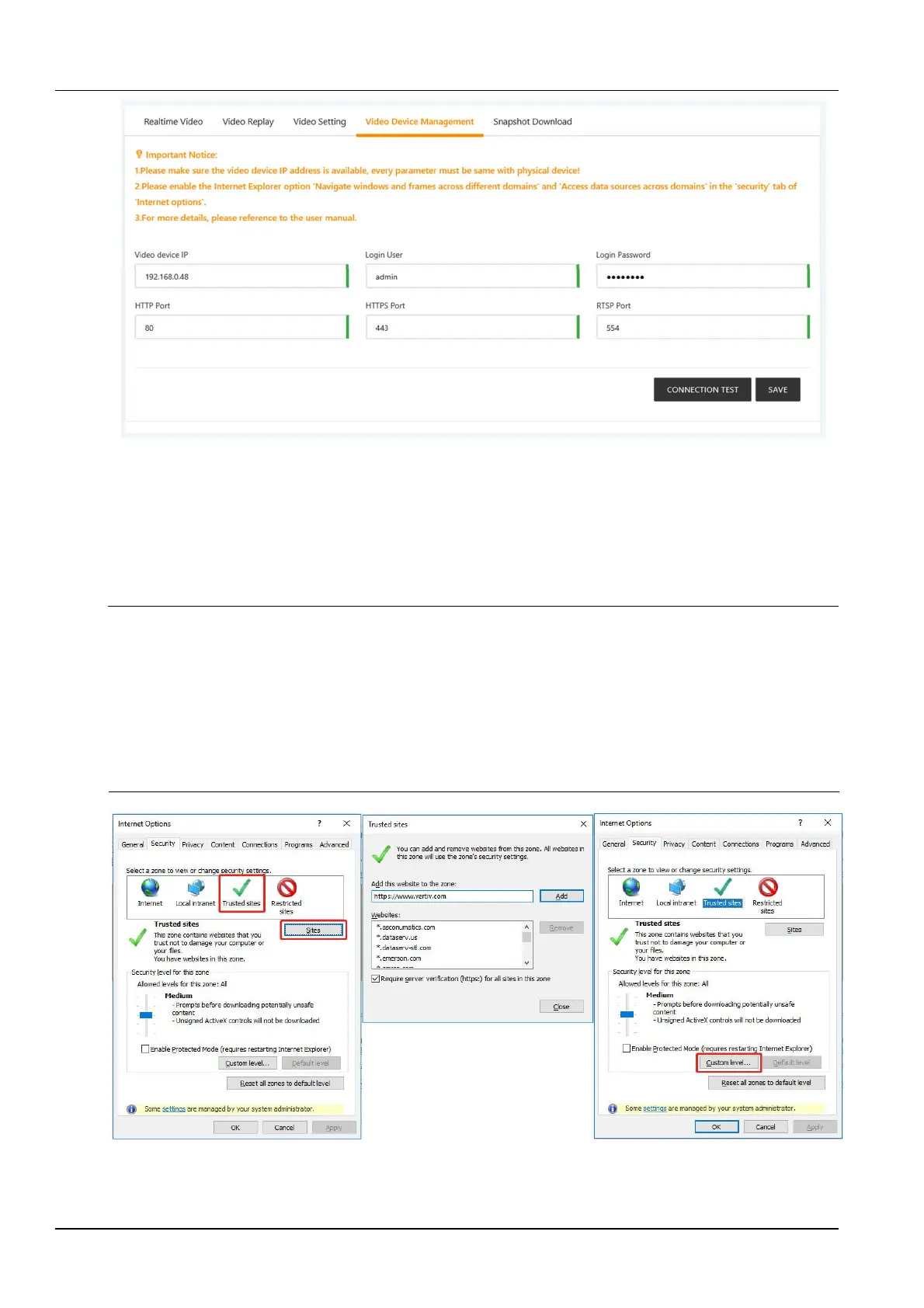
Figure 3-24 Video device management
Enter the IP address of the video device, Login user name and Password, HTTP port, HTTPS port, RTSP port,
and click the Test connection button to test whether the video device is successfully connected. If the prompt
message "Video device connection test is successful!" is displayed, the connection is successful, otherwise the
connection fails. Please check whether the input video device information is correct and the video device connection
is correct. Click the Save button to save the entered video device information.
Note
1.
Please ensure that the input video device IP address is available, and each parameter must be consistent with the actual device!
2.
Please enable "Cross-domain browsing window and framework" and "Access data source through domain" of "Trusted Site"
under "Security" tab in Internet Explorer "Internet Options", as shown in Figure 3-25 and Figure 3-26.
3.
Support single IPC (IP Camera) camera or one NVR (Network Video Recorder).
4.
Supports up to 4 channels of video when NVR is connected.
5.
Video management only supports IE11 browser.
6.
The web authentication mode (configuration--system--security management--authentication mode) of the video device needs
to be set to digest/basic.
Figure 3-25 Security setting 1



 To Next Page