Chapter 3 Web Interface of RDU501
RDU501 Intelligent Monitoring Unit User Manual
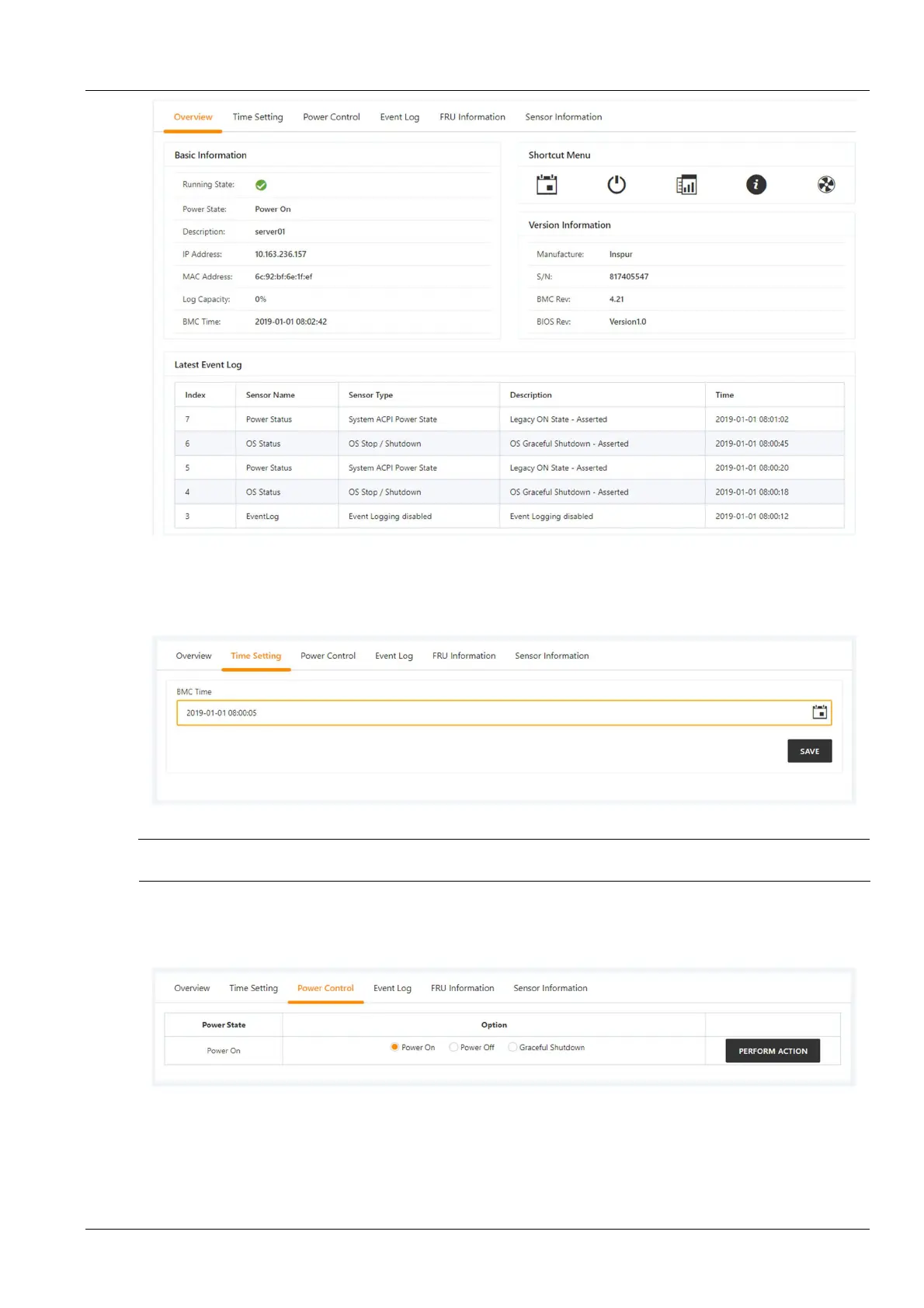
Figure 3-33 IPMI device overview
Click the Time Setting tab in the device detailed information page to enter the time setting page. After selecting the
time to be set, click the Save button to complete the modification of the BMC time of the device. As shown in
Figure 3-34.
Figure 3-34 BMC Time Setting
Note
The BMC needs to be set to the 0 time zone, otherwise the time setting will be disordered due to the time zone problem.
Click the On/Off Control tab in the device detailed information page to enter the On/Off Control page. After selecting
the control option (Power On, Power Off, or Soft Shutdown), click the Perform Action button to complete the power
on/off control of the device. As shown in Figure 3-35.
Figure 3-35 On/off control
Click the Event Log tab in the device detailed information page to enter the event log page. The latest 100 log data is
displayed on the page. You can download all event logs by clicking the Download Log button. Click the Clear Log
button to clear all event logs for this device. As shown in Figure 3-36.



 To Next Page