Chapter 3 Web Interface of RDU501
RDU501 Intelligent Monitoring Unit User Manual
Enable strategy
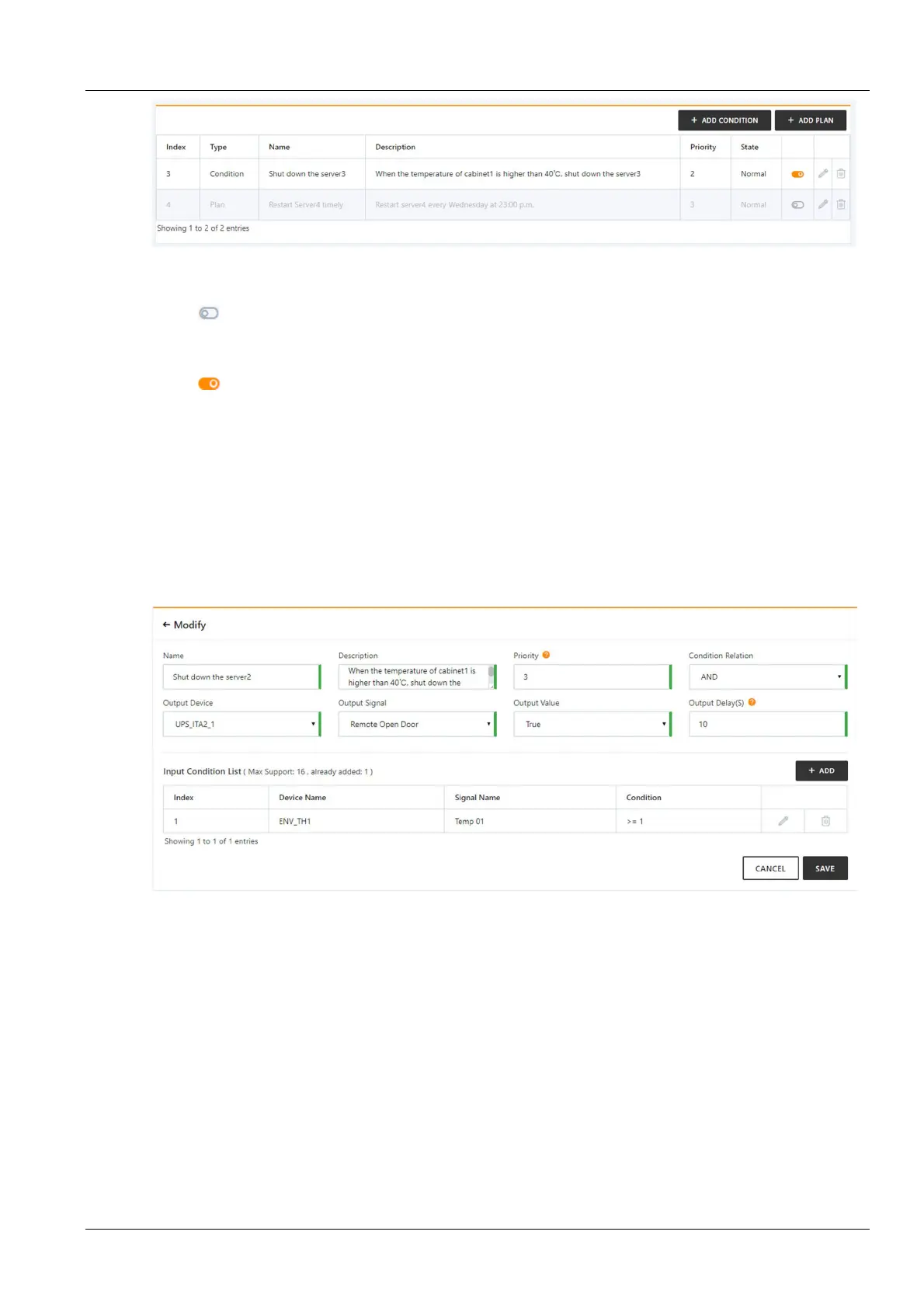
Figure 3-53 Server shutdown management
The icon in the strategy list indicates that the current strategy is disabled. Clicking on the icon will bring up the
prompt "Are you sure to enable the strategy?", click the OK button to enable the strategy.
Disable strategy
The icon in the strategy list indicates that the current strategy is enabled. Clicking on the icon will bring up the
prompt "Are you sure to disable the strategy?", click the OK button to disable the strategy.
Delete strategy
Select the strategy you want to delete in the strategy list, click the Delete icon, the confirmation delete dialog box will
pop up, click the OK button to delete the selected strategy.
Add/modify strategy
1. Conditional strategy
When you click the Add Condition button or modify a conditional strategy, you can open the detailed information
page for the conditional strategy. The page includes basic information about the conditional strategy (name,
description, priority, etc.) and a list of input conditions, as shown in Figure 3-54.
Figure 3-54 Detailed information of the conditional strategy
Click the Add button in the input condition list to open a page that adds input criteria. Fill in the device, signal type
(acquisition or alarm signal) signal name and other information, click the Save button, as shown in Figure 3-55.



 To Next Page