Chapter 3 Web Interface of RDU501
RDU501 Intelligent Monitoring Unit User Manual
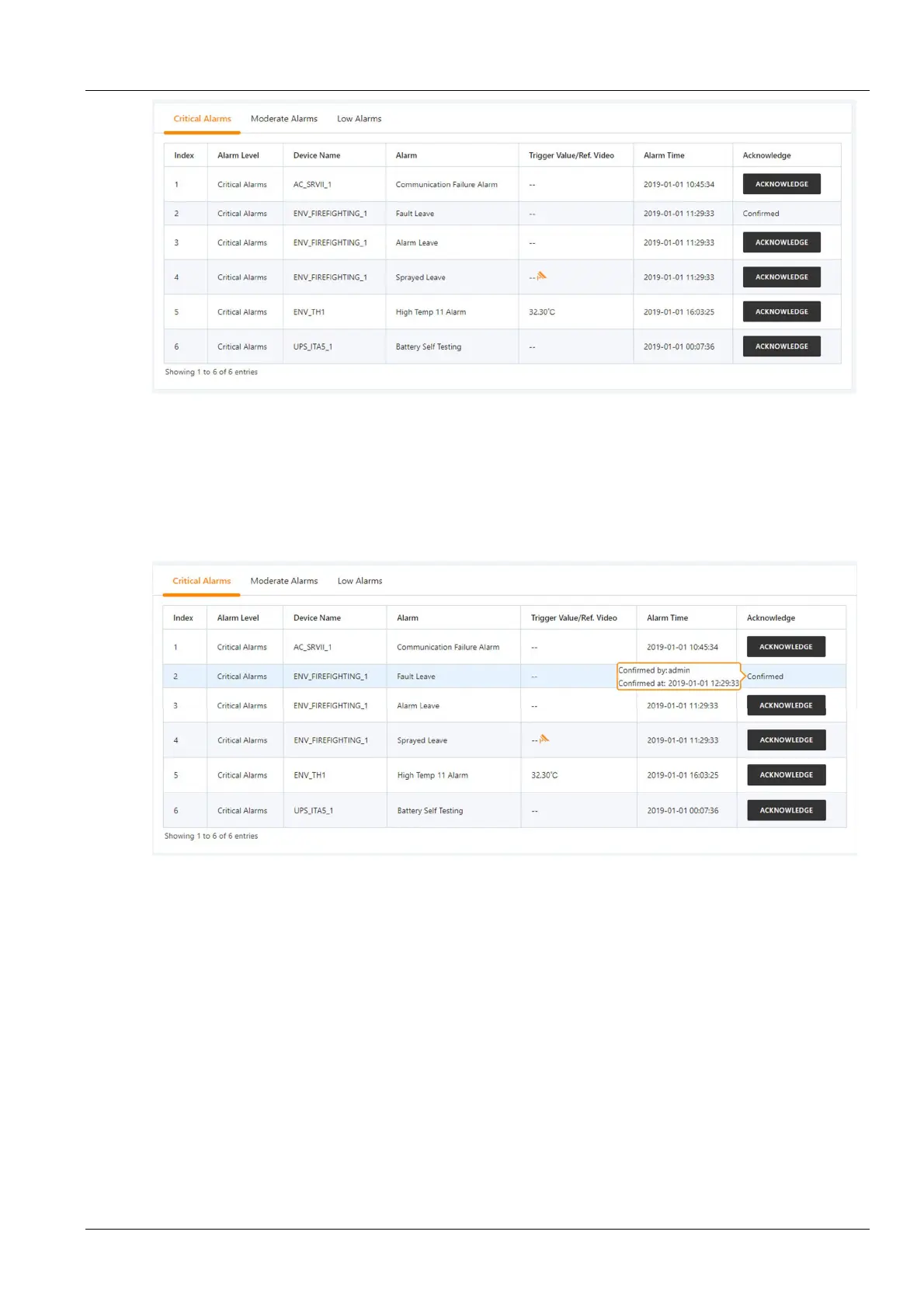
Figure 3-67 Active alarm
1.
The Active alarm can display the current alarm of the system by clicking the alarm level on the tab of the Active
alarm page.
2.
Click the Alarm confirmation button to confirm the alarm. The confirmed alarm will no longer participate in the
alarm linkage, and the alarm notification will be sent only once.
3.
When the mouse cursor is on the confirmed link, the alarm confirmation message will be displayed in floating
position, and the mouse cursor will disappear automatically after being removed, as shown in Figure 3-68.
Figure 3-68 Alarm confirmation information
Historical alarm
Click the Historical alarm submenu under the Alarm management menu. The page shown in Figure 3-69 is
displayed. There are two sub-tabs: Historical alarm query and Alarm report.



 To Next Page