Chapter 3 Web Interface of RDU501
RDU501 Intelligent Monitoring Unit User Manual
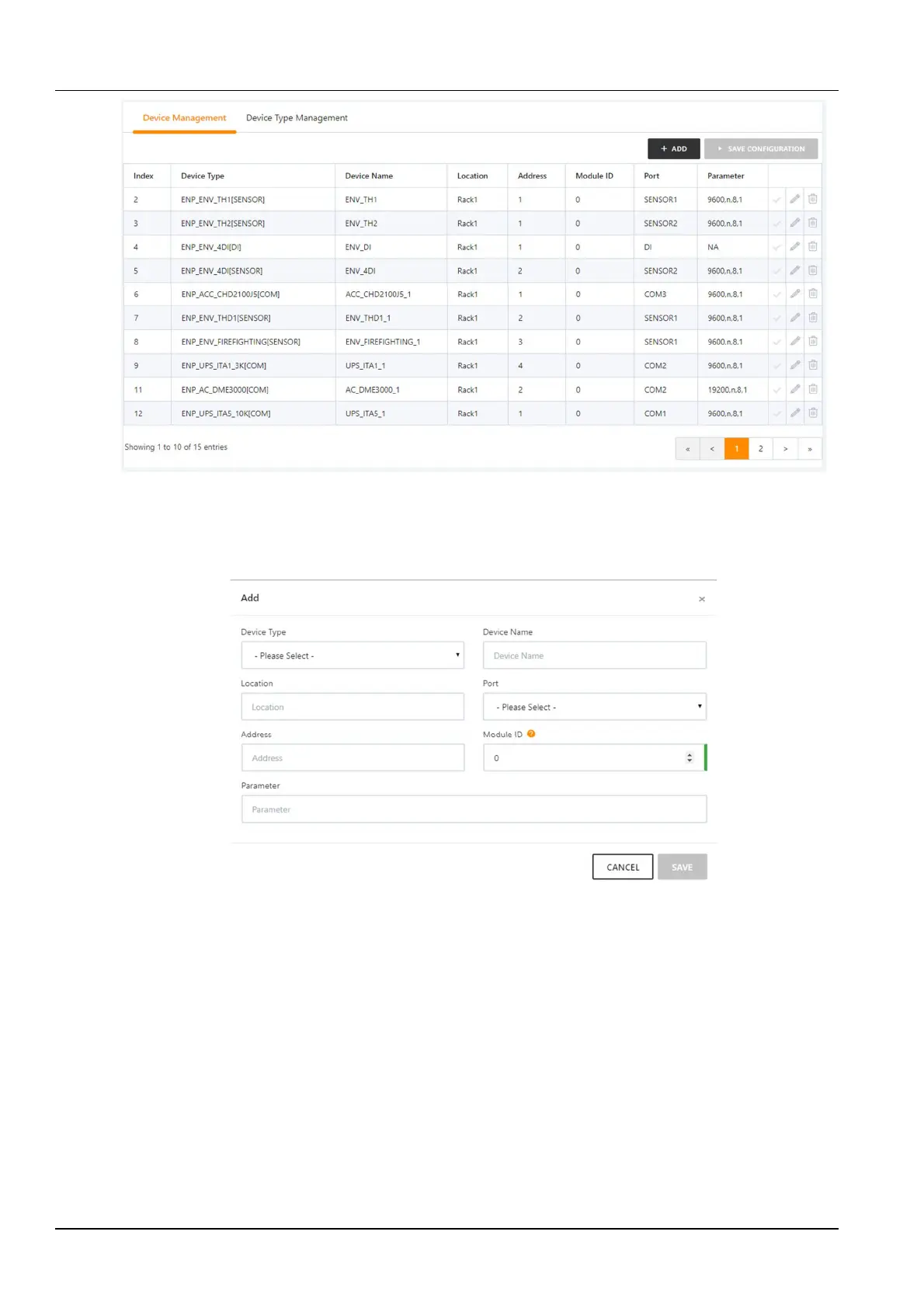
Figure 3-107 Device management
In the page shown in Figure 3-107, users can add/modify/delete device information as follows:
Add equipment
Click the Add button, the interface shown in Figure 3-108 will pop up, and the corresponding device will be added.
1)
Select the device type;
Figure 3-108 Device edit box
2)
Enter the Device Name in the text box of the device name, or use the default device name;
3)
After selecting the device type, the default port number of this device type will be automatically listed in the drop-
down box of the Port Number; if the device type is not selected, the port number cannot be selected;
4)
Enter the Device Address in the text box of the device address. The device address must be a positive integer
from 1 to 100000, and the device address under the same port number is not allowed to be duplicated. Some device
types do not require entering device address, in which case the text box for the Device Address will be grayed out
and cannot be edited. When a device has multiple modules, you need to add a module address. The module address
must be an integer from 0 to 30000, and the module address under one device is not allowed to be repetitive.
5)
Enter the communication parameter in the text box of the Communication Parameter. When the device type is
determined, the message box of the Communication Parameter will display the prompt of the communication
parameter, including the device type communication parameter format and the default communication parameter.



 To Next Page