Chapter 3 Web Interface of RDU501
RDU501 Intelligent Monitoring Unit User Manual
Note
1.
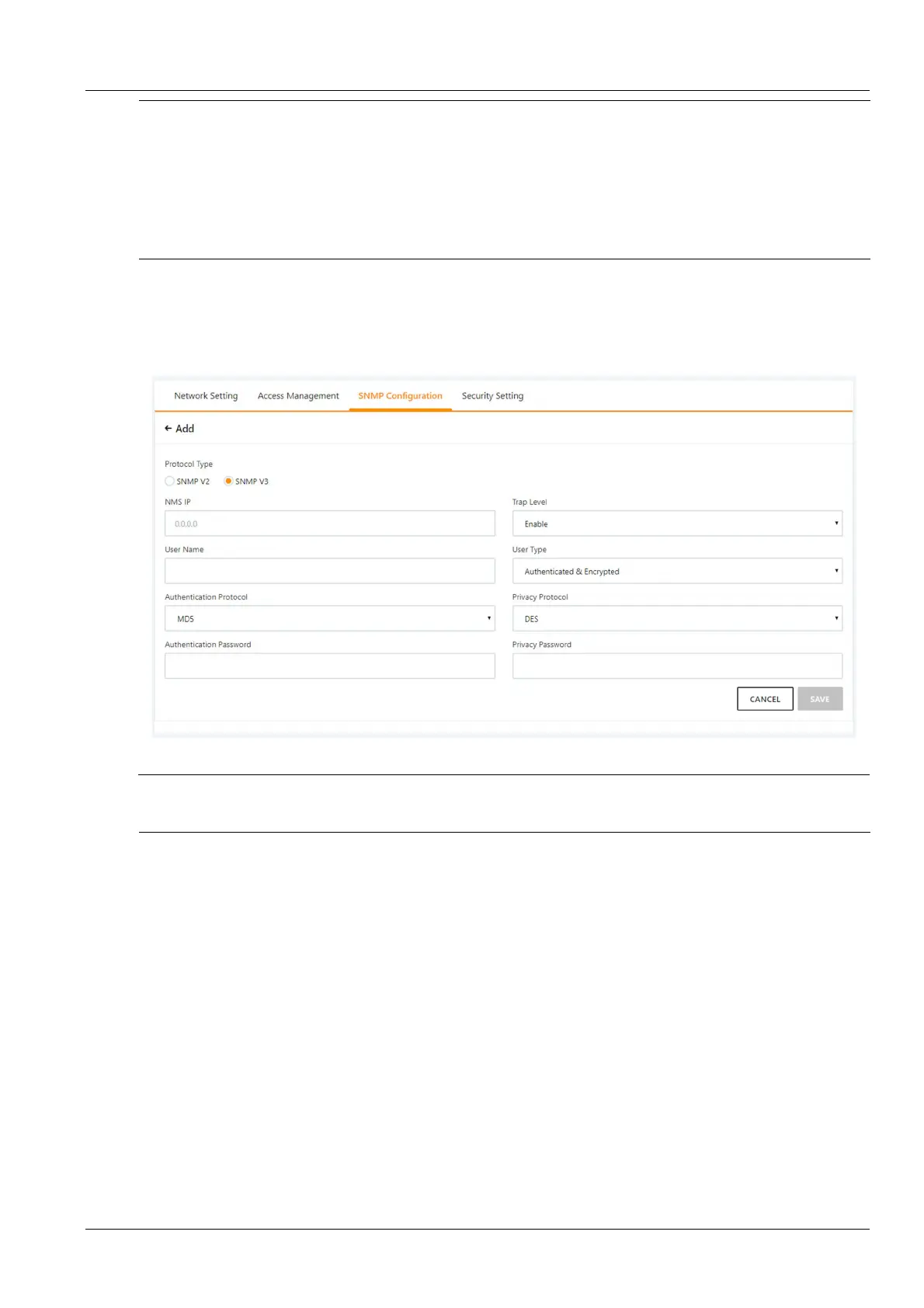
Based on SNMP V2, SNMP V3 adds user authentication and encryption strategies.
2.
If the "Do not authenticate without encryption" strategy is selected for the User type, the Authentication type and
encryption type drop-down box is grayed out and cannot be set.
3.
The current encryption type only supports "DES";
4.
The user needs to customize the authentication and encryption passwords of more than 8 characters, and the password must be
the same as the password set by the host of the SNMP agent data receiving end. Otherwise, the password cannot be decrypted
and received.
After completing the parameter settings, click the Add button to add the NMS;
To modify the NMS settings, select the NMS you want to modify, modify the settings, and then click the Modify
button to save the settings.
To delete the NMS, select the NMS you want to delete and click the Delete button to delete the NMS.
Figure 3-138 SNMP (V3) setting
Note
RDU501 does not provide SNMP proxy service by default. If SNMP service authorization is required, please contact Vertiv
Customer Service Center for purchase.
4. Security settings
Only administrators can browse and configure Security settings.
Click the Network Settings submenu under the System Settings menu, and then click the Security Settings tab.
The page shown in Figure 3-139 pops up.



 To Next Page