Using the Port Connections
Page 6-2 Mastertech 3100 Operator’s Manual
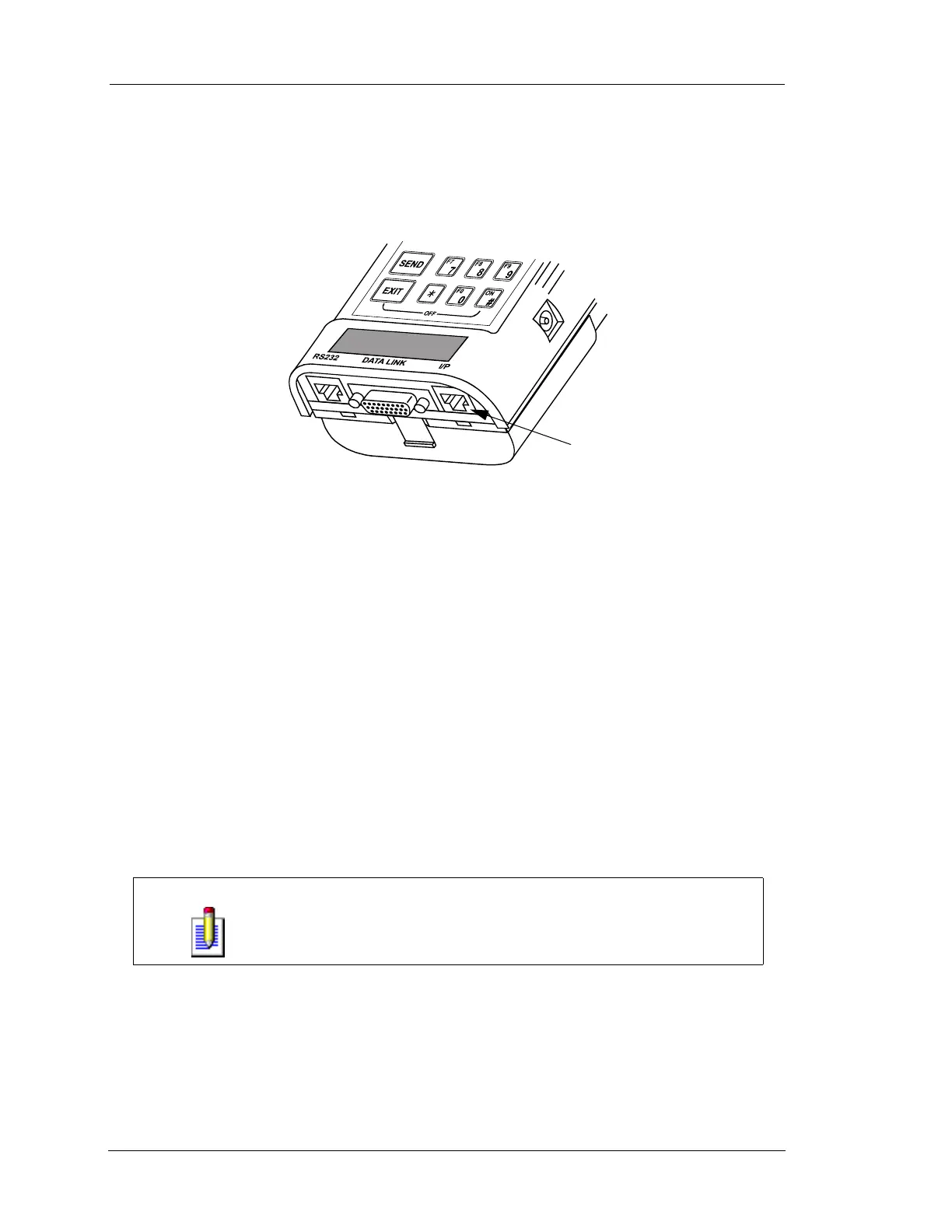
INSTRUMENTATION PORT
The Instrumentation Port connection is a 10-pin RJ45 “phone plug” connector on the bottom right of the
tester. The Instrumentation Port supports the use of the Diagnostic Test Leads and other I/P devices.
DIAGNOSTIC TEST LEADS
Connect the Diagnostic Test Lead Adapter cable to the I/P connector on the bottom right end of the tester.
Connect the Diagnostic Test Lead to the Test Lead Adapter. Install test lead tips (test pin probes, alligator
clips, or insulation piercing hooks) onto the Diagnostic Test Lead. The Diagnostic Test Leads provide input
to the following test capabilities:
• Digital Volt Meter
• Duty Cycle Measurement
• Frequency Counter
• Oscilloscope
NOTE
The Diagnostic Test lead set provided in the Mastertech kit is only
intended for automotive-type signal measurement. It is not a lab-quality
Digital Volt Ohm Meter (DVOM) or oscilloscope. Input voltage should not
exceed ± 20 volts.
FIGURE 6-2. Instrumentation Port
Instrumentation Port


 To Next Page