Battery Charging and Replacement
Mastertech 3100 Operator’s Manual Page 8-3
To replace the batteries:
1. Disconnect the power supply cable from the vehicle and from the tester.
2. Press P x to turn the tester off.
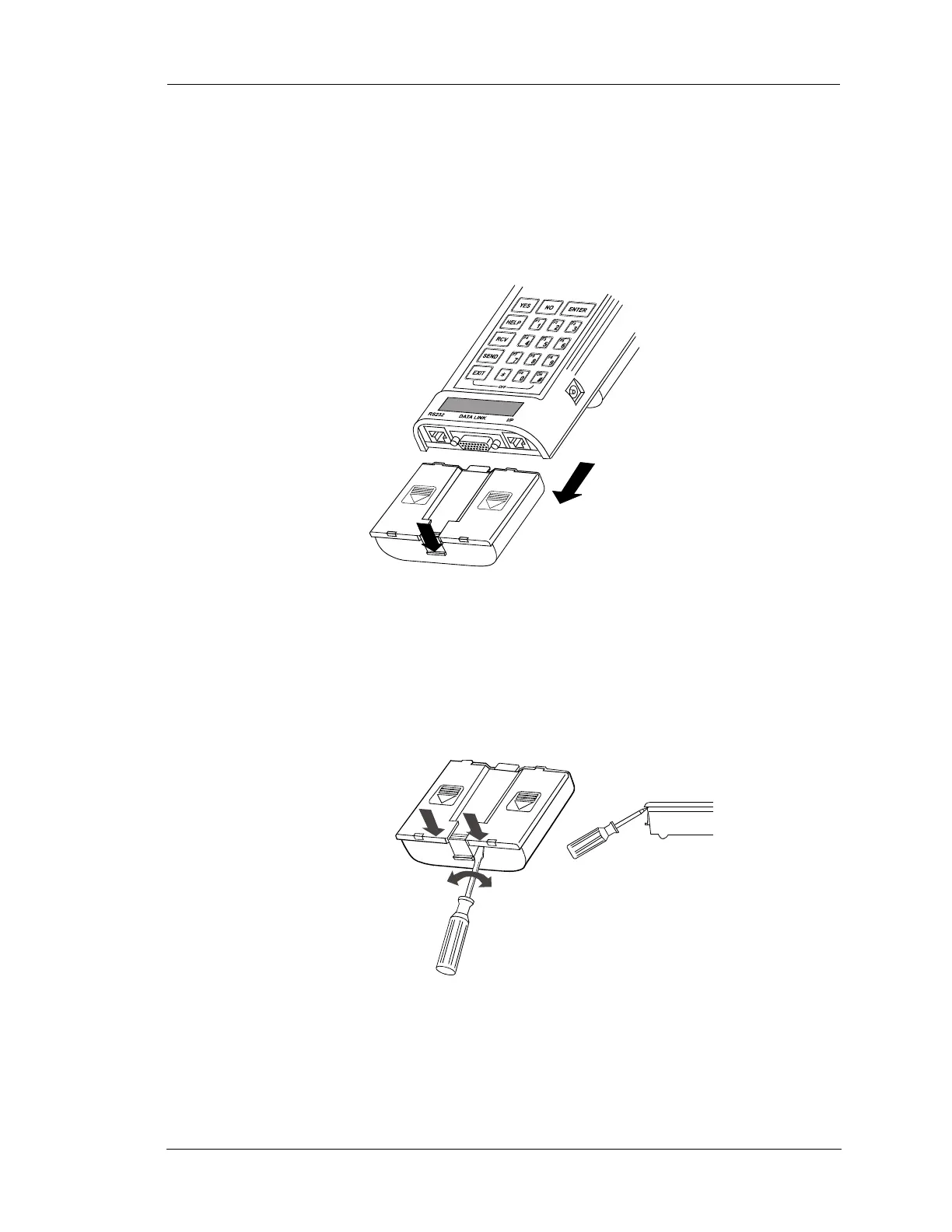
3. Press the tab at the bottom end of the battery pack while pulling the battery pack toward the bottom of
the tester.
4. To remove the battery pack cover, grasp the battery pack with one hand and position a screwdriver (flat
blade) as shown in the figure below. Push the screwdriver blade against the battery pack side wall and
the battery cover. While pushing, twist the screwdriver slightly until the cover pops loose from the
locking tabs. Repeat for the other side.
5. Remove the six NiCad batteries.
FIGURE 8-2. Removing the Battery Pack
Slide Batter Pack
Toward Bottom of
Tester
Press Tab Down
NiCad Battery Pack
FIGURE 8-3. Removing the Battery Pack Cover
NiCad Battery Pack
Twist the screwdriver
slightly until the cover
pops loose


 To Next Page