Battery Charging and Replacement
Mastertech 3100 Operator’s Manual Page 8-5
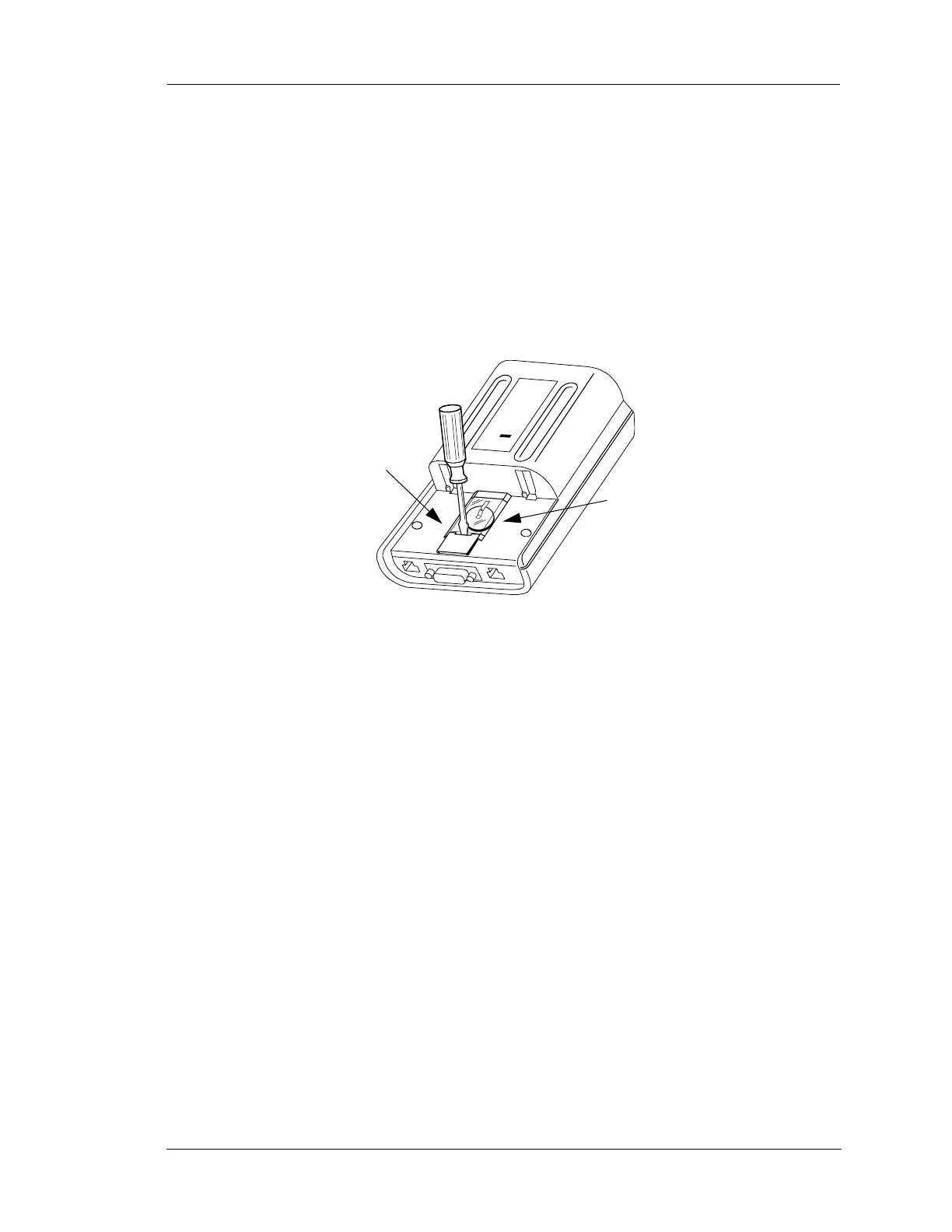
3. The round Lithium battery is located under a plastic cover beneath the battery pack on the back of the
tester.
4. To remove the NiCad battery pack, press the tab at the end of the battery pack while pulling the battery
pack toward the bottom of the tester.
5. To remove the Lithium battery compartment plastic cover, use your fingernail or a small screwdriver to
lift the bottom end of the cover away from the tester.
6. To remove the battery, gently lift up on the end of the metal strap that holds the battery in place. Note
that the plus (+) side of the battery is toward you.
7. Remove the battery.
8. To install the new battery, lift the metal strap and insert the battery so the plus (+) side is facing you.
9. Install the plastic cover so the two plastic tabs on one end of the cover are hooked into the opening
toward the top of the tester.
10. Press on the bottom end of the plastic cover until it snaps into place.
11. Slide the battery pack onto the tester so the tab at the top fits into the slot on the tester. The battery pack
should lock into place.
12. Perform the Setup procedure described in the program card operator's manual.
FIGURE 8-5. Removing the Lithium Battery
Use screwdriver
to remove plastic
cover
Lithium
Battery


 To Next Page