100
Maintenance
> Remove the end of the P.T.O. shaft with the friction clutch.
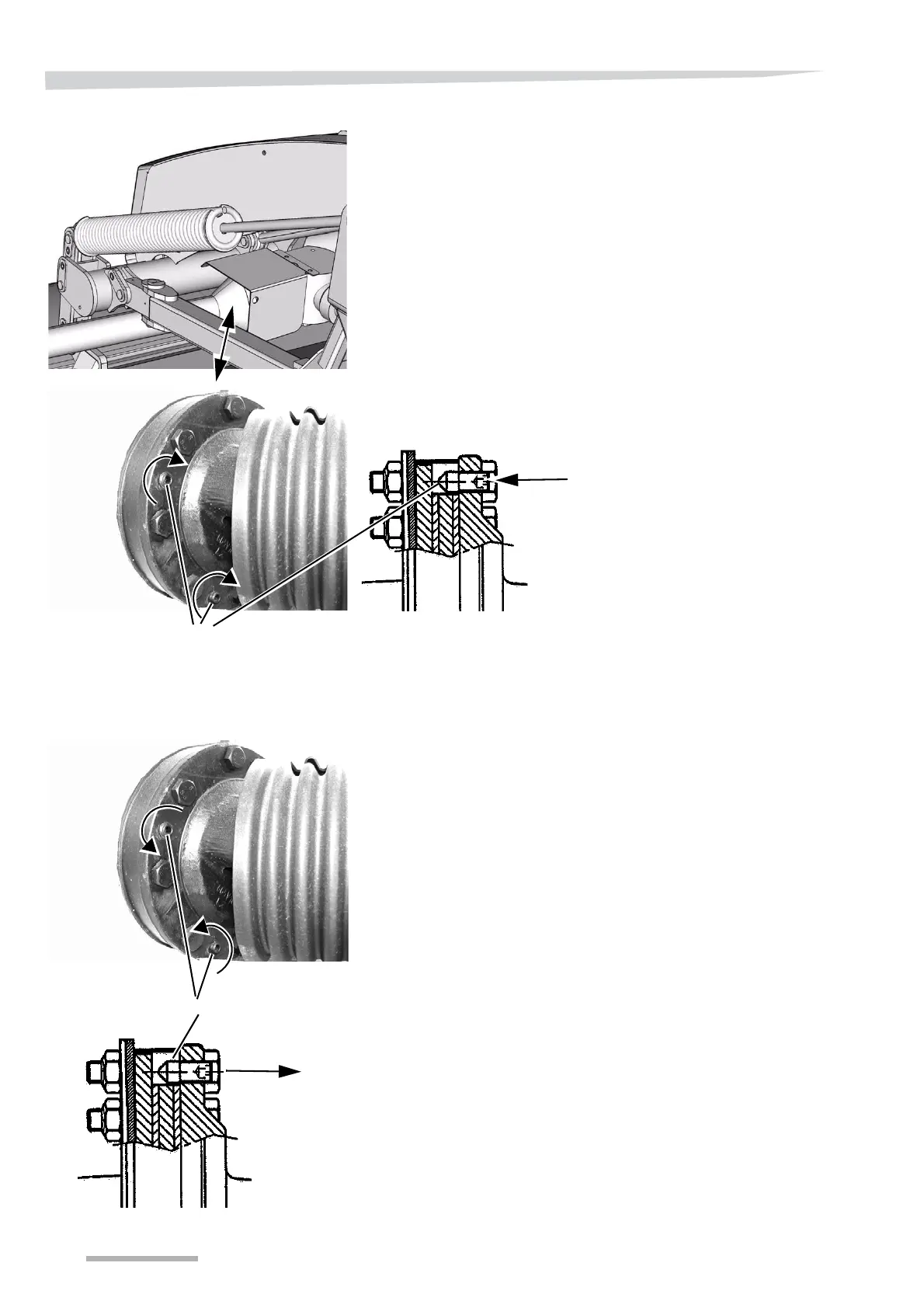
> Tighten the screws shown on the friction clutch.
> Mount and fasten the friction clutch on the machine.
> Start the tractor and connect the tractor's PTO outlet.
> Let the clutch rotate for approx. 5 seconds at the lowest speed
possible.
NB
Do not allow the friction clutch to rotate for more than approx. 5
seconds at a time, as this may damage the friction disc.
• If the clutch does not slip, repeat the procedure 2 to 3 times.
NB
If the clutch still does not slip, the clutch must be taken apart and all
contact surfaces must be cleaned.
»Friction clutch« page 118
> Disconnect the PTO outlet and stop the tractor.
> Remove the friction clutch from the machine.
> Unscrew all the screws shown on the friction clutch.
> Mount and fasten the friction clutch on the machine.
> Remove the wooden block from the cutterbar.
> Close the front guard around the cutting unit.



 To Next Page