UniOP
44
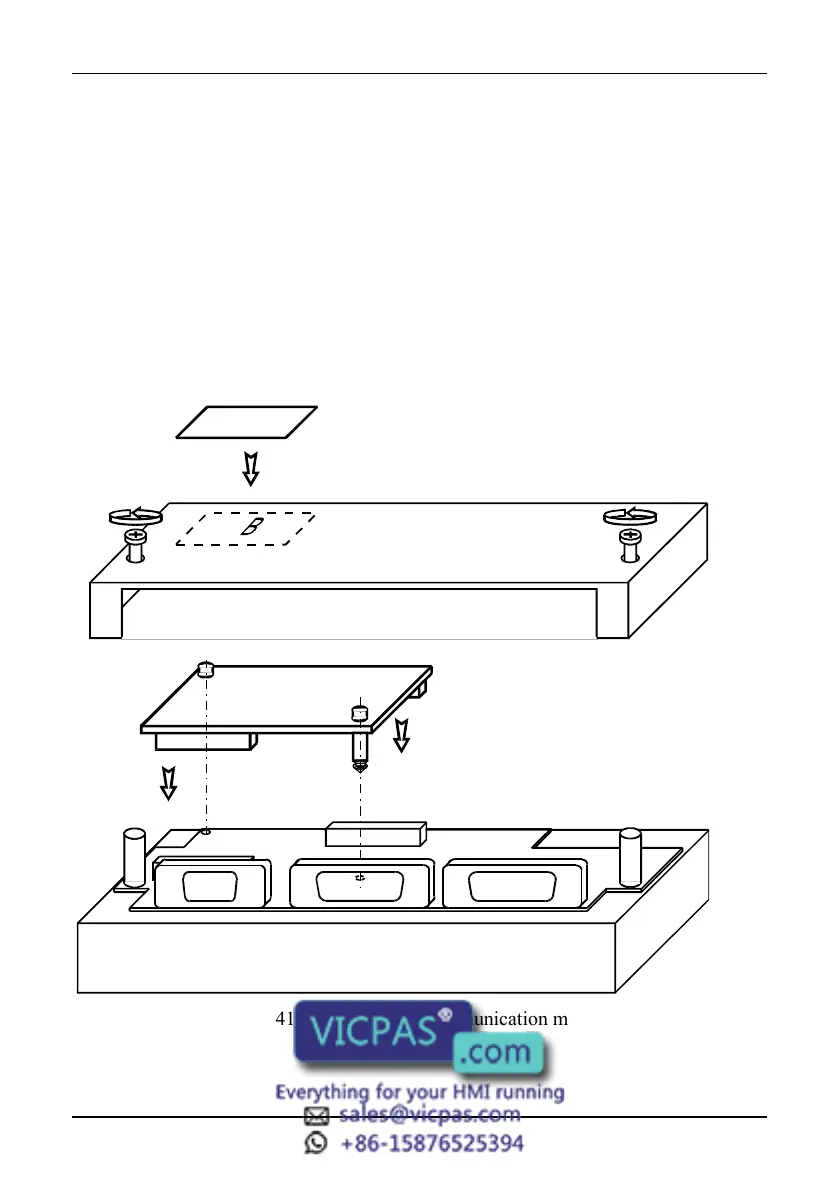
The procedure to mount the communication modules is the following:
1) turn off the unit
2) partially unscrew with a screwdriver the 2 screws holding the rear cover. The
screws are labelled ‘A’ in Figure 44
3) remove the cover (for eTOP05/05EB/06/06C/20C/33C/40C/50C and ePAD33C
lever with screwdriver on the slot on the cover’s side).
4) plug the module in the red connectors; make sure the connectors are locked
5) replace the rear cover
6) fix the 2 screws ‘A’ (for eTOP05/05EB/06/06C/20C/33C/40C/50C and ePAD33C
close the cover with a little pressure).
7) stick in the area ‘B’ the label describing the functionality of the AUX Port. The
label is delivered with the modules
A
Figure 41 - Mounting the communication modules



 To Next Page