Pag. 8 MNVCPTH300_1541_EN
Pan & tilt connection to CBZ keyboard
WARNING: before the connection, make sure that the output voltage CBZ keyboard corresponds to pan & tilt
voltage (Refer to the identification data of the keyboard and of the pan & tilt motor).
Where to operate: J1 terminal block in the upper printed circuit of the pan & tilt motor (see drawing)
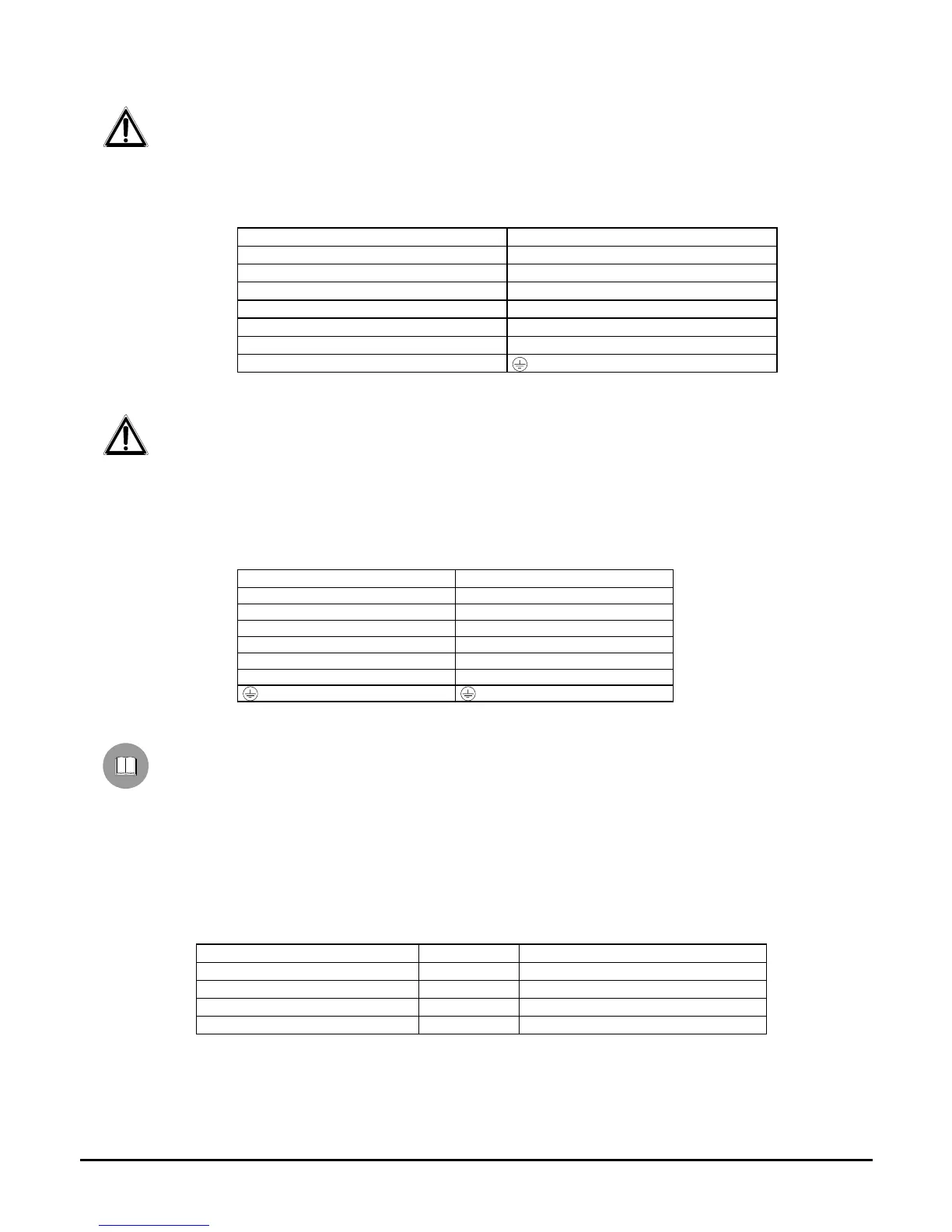
Adjustments : connect the wires from the keyboard to the pan & tilt motor according to the following table:
CBZ output wires J1 terminal block (Pan & Tilt)
WHITE Com
BROWN Down
YELLOW Up
GREY Right
PINK Left
GREEN Auto
YELLOW/GREEN
Pan & tilt connection to DTMRX1/DTRX3 receiver
WARNING: before the connection, make sure that the output voltage of the receiver corresponds to pan & tilt
voltage (Refer to the identification data of the pan & tilt motor and to DTMRX1/DTRX3 manual).
Where to operate: J1 terminal block in the upper printed circuit of the pan & tilt motor (see drawing), terminal block of
the receiver (see DTMRX1/ DTRX3 manual)
Adjustments: connect the terminal block J1 of the pan & tilt motor to that of the receiver according to the following
table
Connection to the receiver Terminal block J1 (Pan & Tilt)
COM Com
DOWN Down
UP Up
RIGH Right
LEFT Left
AUTO Auto
Preset connection to DTRX3 receiver (only PTH310P / PTH311P)
The following procedure has to be carried out only for PRESET pan & tilt motors and connected to DTRX3
receiver.
Where to operate : J4 terminal block in the upper printed circuit of the pan & tilt motor, preset terminal block (see
DTRX3 manual)
Adjustments: connect the J4 terminal block of the pan & tilt motor to the preset terminal block of DTRX3 according to
the following table:
Connection to DTRX3 Meaning Terminal block J4 (Pan & Tilt)
Vcc +5 Volt Vcc
Pan Horizontal Pan
Tilt Vertical Tilt
Gnd 0 Volt Gnd


 To Next Page
 Loading...