Cutter Cover Install—020811 pg. 8
Cutting Bar—Cutter Cover Installation
3. Apply non-permanent loctite to the wheel side of the hexagon nut and screw on to
existing bolts. (4)
4. Place the cover over the cutter ensuring the screws on the cover are loose to ad-
just the size as needed.
Cutter Cover Install—020811 pg. 5
Carousel Mate—Cutter Cover Installation
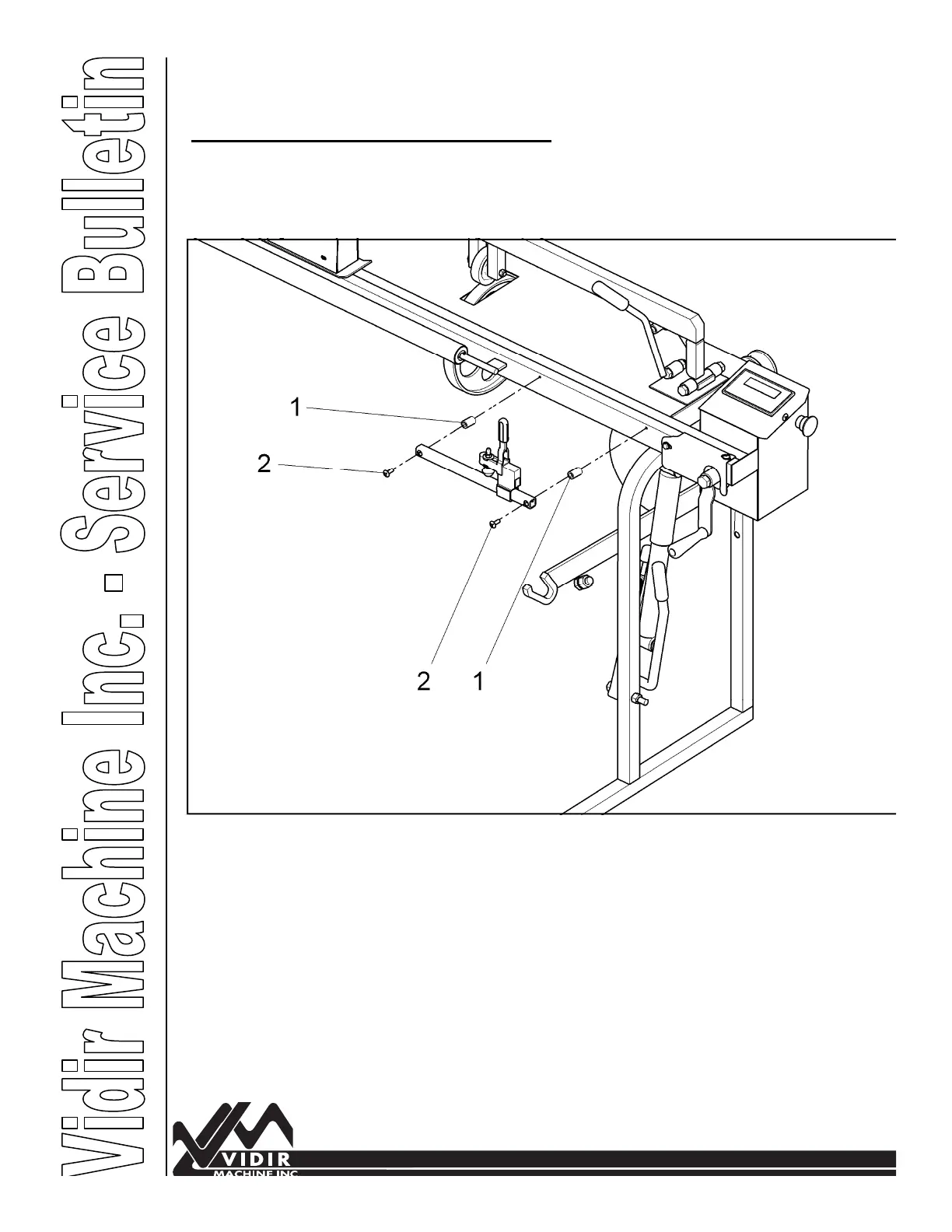
Hold Down Arm Spacer Installation
You will need to install spacers to be sure
the cover does not hit the hold down lever.
Kit Includes: Hold Down Arm Spacers (4), Screw 1/4” x 1 1/4” (4)
Tools Required: Screw Driver
1. Remove the existing screws to remove the hold down tube and toggle clamp. Be
sure to put your hand under the spacers so they don't drop.
2. Insert extra spacers provided (Item # 1) and insert 1/4” x 1 1/4” screws (item#2)
provided. You will need to do this on both ends of the carousel mate.


 To Next Page