128
Calling up the service menu
Tap the following buttons:
1. " "
2. "Service"
3. Enter password "viservice".
4. Confirm with .
5. Select required menu.
Note
Not all menus will be available, depending on the
system equipment level.
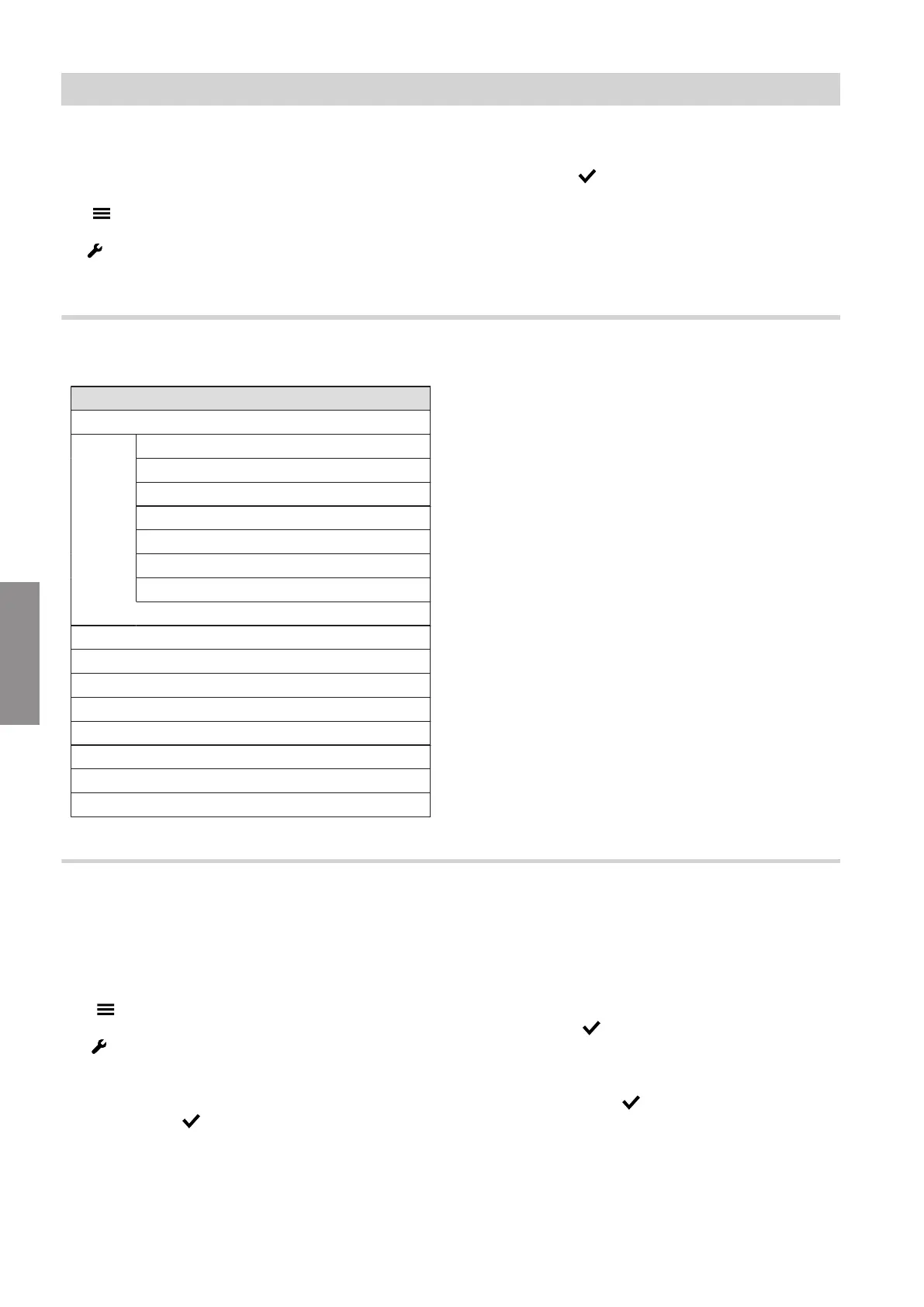
Service menu overview
Service menu
Diagnostics
Refrigerant circuit
General
Heating/cooling circuit 1
Heating/cooling circuit 2
Heating/cooling circuit 3
Heating/cooling circuit 4
DHW
Change passwords
Commissioning
Appliances detected
Access point on/off
Exit demo operation
Exiting the service menu
Actuator test
System configuration
Changing the service password
In the delivered condition, "viservice" is preset as the
password for accessing the "Service menu".
Tap the following buttons:
01. " "
02. "Service"
03. Enter password "viservice".
04. Confirm with .
05. "Change passwords".
06. "Service menu"
07. Enter current password.
08. Confirm with .
09. Enter new password.
10. Confirm twice with .
System configuration and diagnostics
Service menu
6222080
Diagnosis







 To Next Page