129
Resetting all passwords to delivered condition
Tap the following buttons:
1. Request the master password from Viessmann
Technical Service.
2. " "
3. "Service"
4. Enter password "viservice".
5. Confirm with .
6. "Change passwords"
7. "Reset all passwords"
8. Enter master password.
9. Confirm twice with .
System configuration
The parameters can be adjusted via 3 user interfaces:
■
HMI programming unit of the heat pump control unit
■
ViGuide app
■
All ViGuide web applications: ViGuide Plus, ViG-
uide Pro, ViGuide Business
For further information on ViGuide: See
www.viguide.info.
■
Depending on the system equipment and which user
interface is selected, not all parameters may be
available.
■
Some parameters are set during commissioning with
the help of the commissioning assistant.
■
The factory settings and setting ranges for the
parameters may vary for different heat pumps and
system configurations.
Setting parameters on the HMI programming unit
Tap the following buttons:
01. " "
02. "Service"
03. Enter password "viservice".
04. Use to confirm.
05. "System configuration"
06. Use to select the required parameter group, e.g.
"DHW".
07. Use / to select the required parameter cate-
gory, e.g. "Domestic Hot Water Setpoint Meta-
data".
08. Use to select the required parameter, e.g.
"504.1 Low".
09. Use / to select the required value, e.g.
"30 °C".
10. Use to confirm.
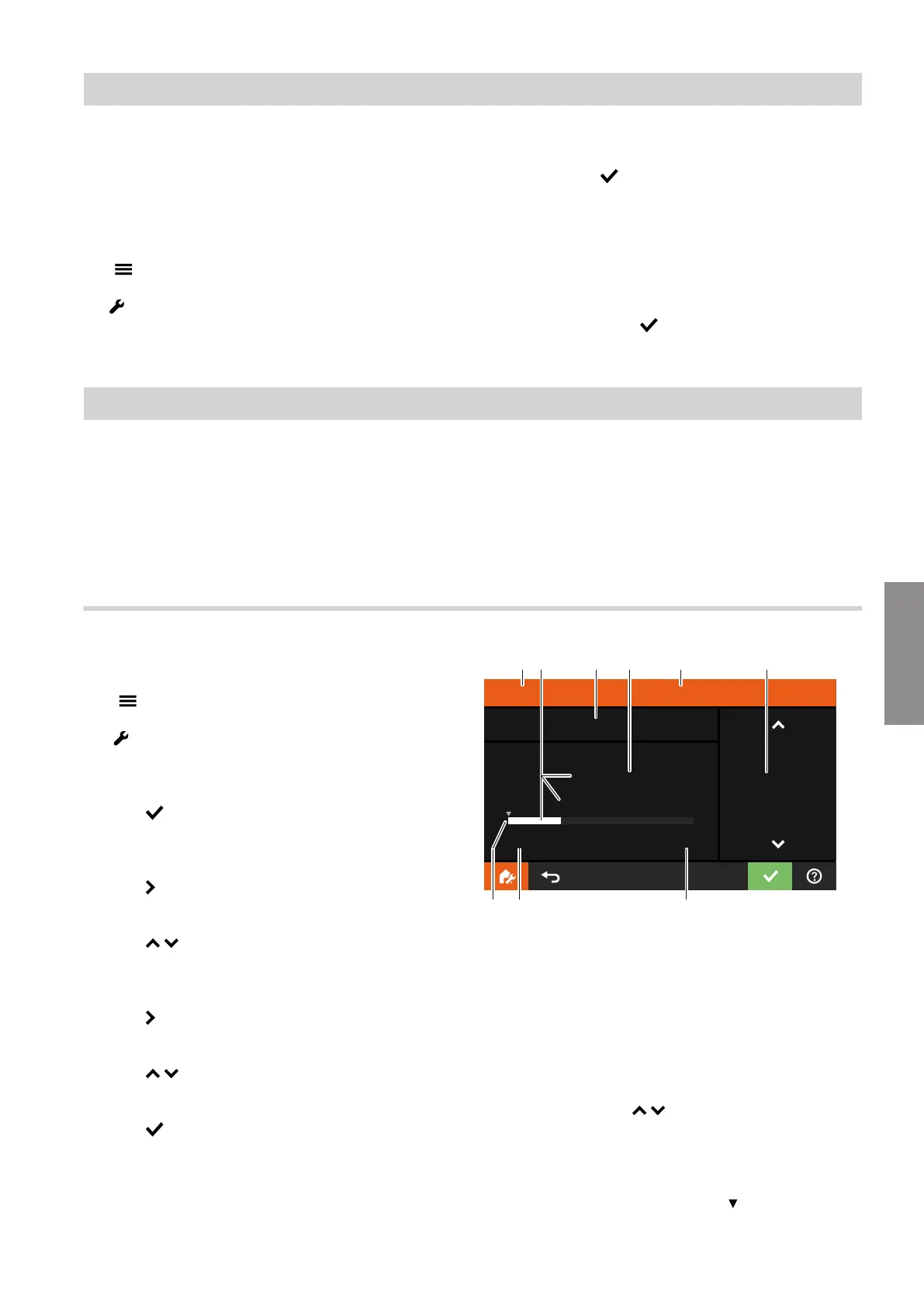
Domestic Hot Water Setpoint Metadata - Low
504.1
30.0
°C
300
Min
10.0
Max
95.0
30.0
EC D FB
H G
A
10.0
K
Fig. 85
A
Parameter category
B
Set value
■
Display with decimal point
and
■
Display with light-coloured bar
C
Number of parameter
D
Unit for selected value
E
Name of parameter
F
Adjust value with /
■
Display without decimal point
■
Step in this example: 0.1 °C
G
Upper limit of the setting range
H
Lower limit of the setting range
K
Factory setting highlighted with
System configuration and diagnostics
Service menu (cont.)
6222080
Diagnosis







 To Next Page