22
DHW cylinder settings
Changing switching times (cont.)
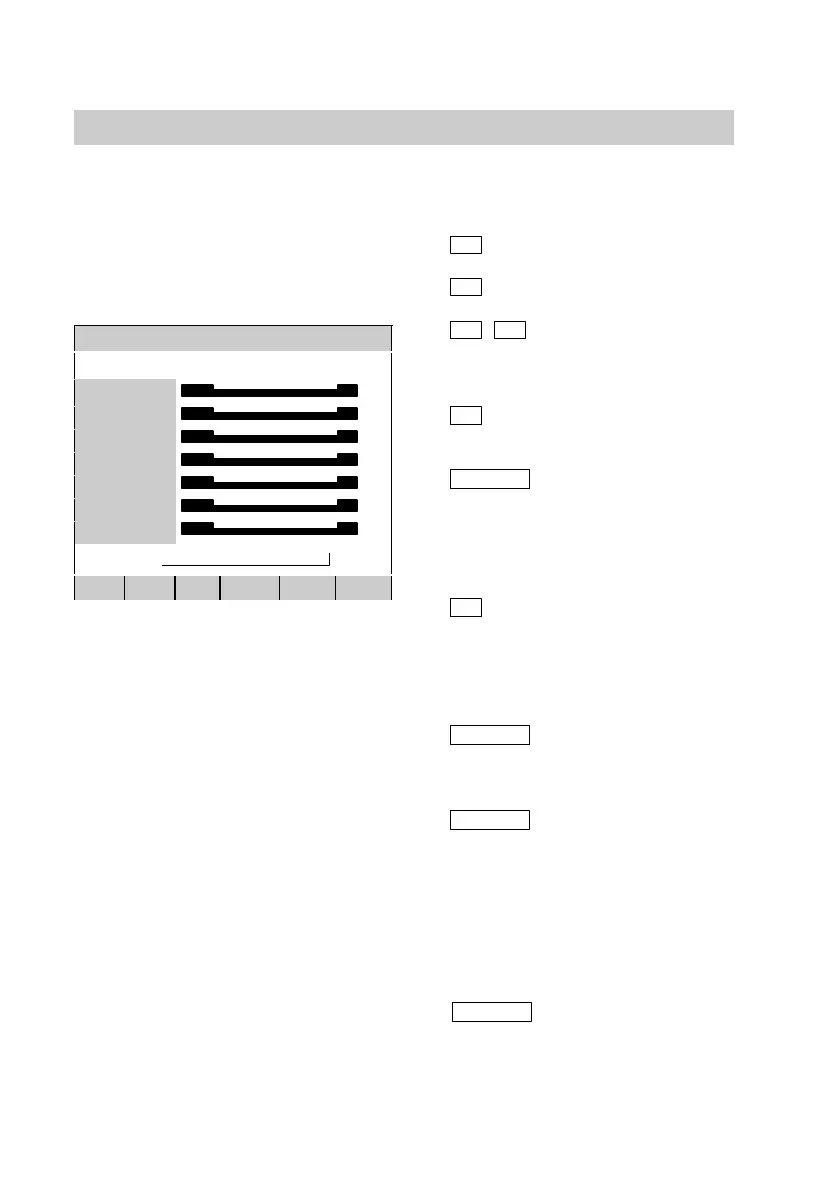
DHW cylinder timer
20:0020:14 0 3 6 9 12 15 18 21 24
MONDAY AU
TUESDAY AU
WEDNESDAY AU
THURSDAY AU
FRIDAY AU
SATURDAY AU
SUNDAY AU
OFF
∧
DAY TEMPE >> SET>> STANDA BACK
Open the programming unit flap and
press the following keys:
11.
C
for "Programme".
12.
B
for "DHW cylinder 1".
13.
±
/
°
press until "Timer/
switching times" is
highlighted.
14.
>>>
press until the "Timer"
menu is shown.
15.
DAY
press until the
respective day of the
week or all weekdays
are highlighted
simultaneously.
16.
>>
press until the arrow is
positioned at the point
(time), from where the
operating mode should
be changed.
17.
TEMPE
press until the required
operating mode is
shown (see page20).
18.
SET>>
press for the period
during which the
modified operating
mode should be active.
19. Proceed as described in items 6
to 8 for the setting of further
switching times.
10.
BACK
press to confirm.
Close the programming unit flap.
5592 415GB






 To Next Page