34
For information
Scanning parameters
This menu allows you to display the following for the heat pump, the DHW
cylinder and the heating circuits with mixers:
controlled devices,
switching states,
set and actual temperatures.
Open the programming unit flap and
press the following keys:
Heat pump overview
Compressor : On
Primary pump : On
Circulation pump : On
Temp. set−point : 21.0
Heat storage top : 53.0
Heat storage bottom : 45.2
Status Active
charac BACK
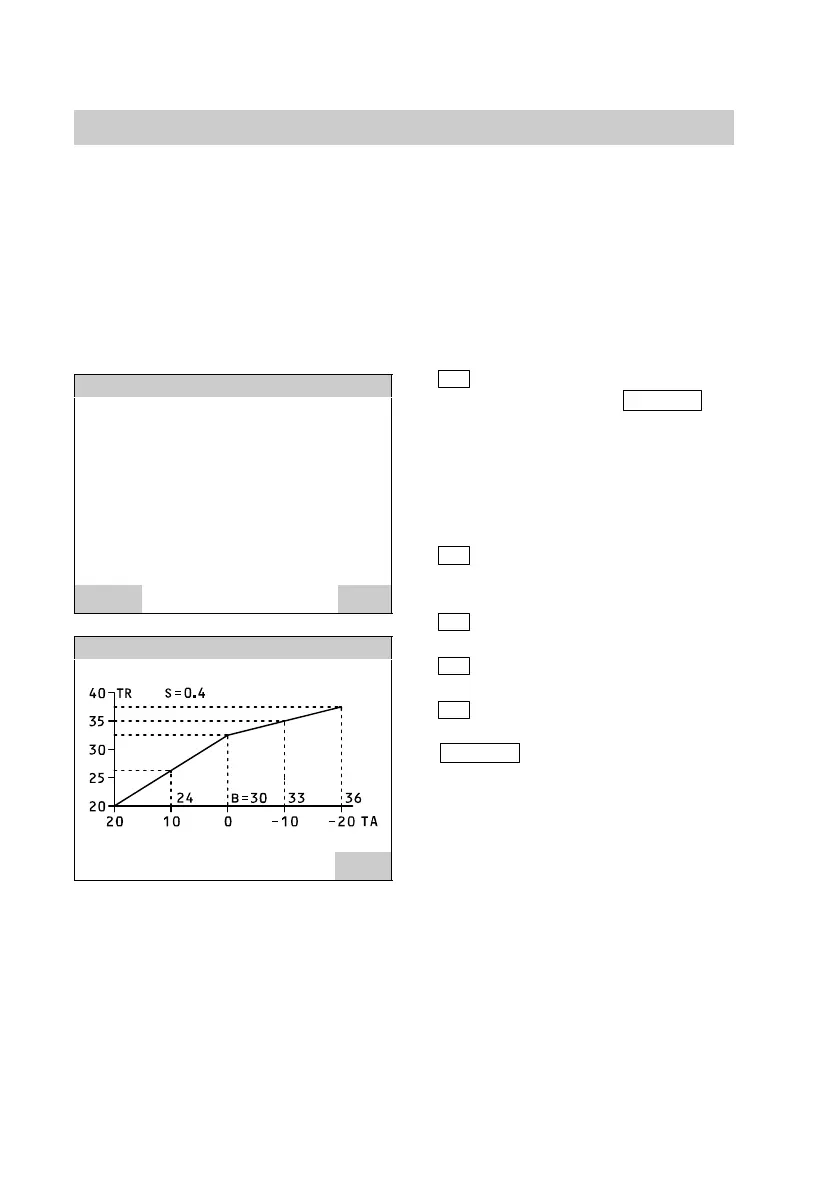
Heat pump characteristic
BACK
TA Outside temperature
TR Return temperature
TV Flow temperature
1.
A
for "Information".
Using the
charac
key enables you to
display the curves for
the heat pump and the
heating circuits with
mixer.
2.
E
for
"Contr. loop overview".
3.
A
for "Heat pump"
or
B
for "DHW cylinder 1"
or
C
for "Mixer 1".
4.
BACK
press to confirm.
Close the programming unit flap.
5592 415GB






 To Next Page