< >
>> <<
>>>
42
Indices
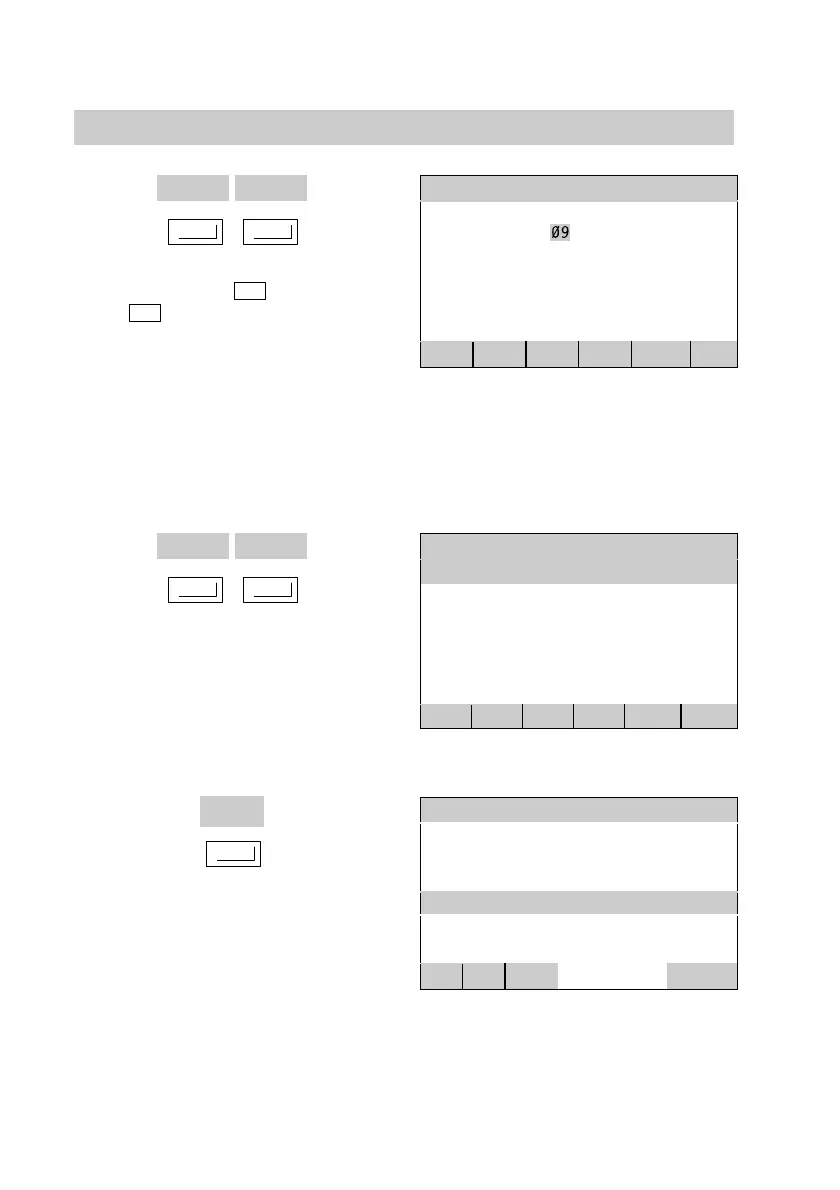
Overview of menu keys (cont.)
These keys enable highlights to be
shifted to the left (
<
) or to the
right (
>
).
Highlights are the numerical block
highlighted with dark shading.
Example: The month of September
(09) is highlighted; this means, that
this numerical block is active, and
that the month can be selected.
Date and time
Tuesday 24.09.02 07:56
previous : Summer time CES
new : Summer time CES
<
>
+
BACK
OK
A condition can be modified by
pressing one of these keys.
The new condition will be displayed.
Example: The "current op. mode" of
the DHW cylinder is "On".
DHW cylinder 1
Current op. mode : On
DHW cylinder temp : 45.0
Timer/switching times
±
°
>> <<
STANDA
BACK
This key enables the next screen to
be opened.
Example: Pressing this key leads to
the display of a screen, where
switching times may be set.
Heat pump
Current op. mode : Standard
Normal temperature : 22.0
Reduced temperature : 16.0
Timer/switching times : 16.0
Too warm/too cold
±
°
>>>
BACK
5592 415GB






 To Next Page