24
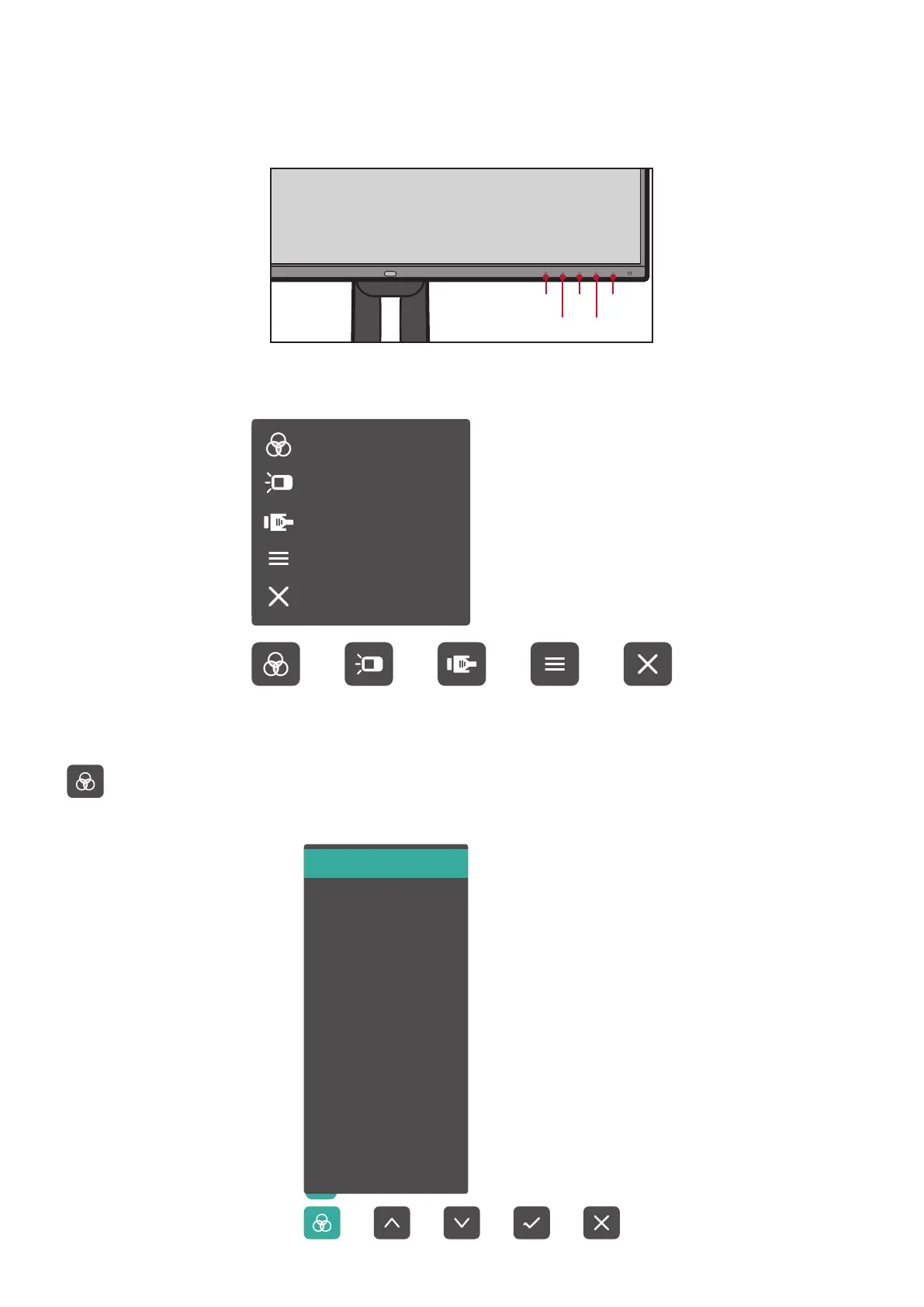
Using the Control Panel Keys
Use the control panel keys to access the Quick Menu, activate Hot Keys, navigate
the On-Screen Display (OSD) Menu, and change the settings.
1 3 5
42
Quick Menu
Touch the 1/2/3/4 key to activate the Quick menu.
Standard Color
Contrast/Brightness
Input Select
Main Menu
Exit
NOTE: Follow the key guide that appears on the bottom of the screen to select
the option or make adjustments.
Standard Color
Contrast/Brightness
Input Select
Main Menu
Exit
Standard Color
Select one of the preset standard color settings.
Adobe RGB
sRGB
EBU
DCI-P3
SMPTE-C
REC709
DICOM SIM
I-Phone (sRGB)
CAL 1
CAL 2
CAL3
Custom









 To Next Page