VIKING TECHNICAL SUPPORT 1.800.908.0884
35
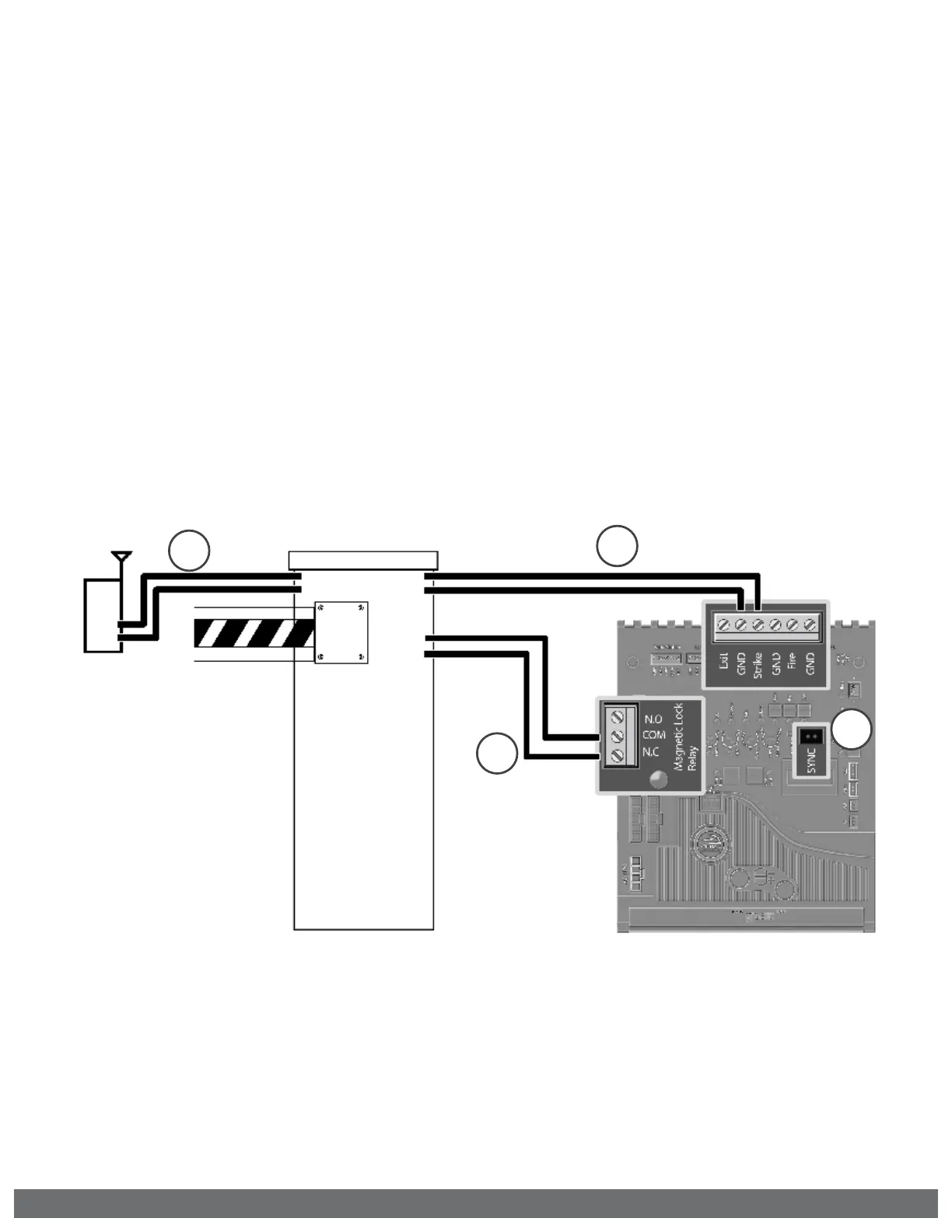
Barrier Arm Synchronization
NOTE:
The Control Board provides a convenient solution for applications that require
synchronized operation with the Barrier Arm Operator.
This type of application opens and closes in the following pattern:
1.
Open Command is provided only to the Barrier Arm operator.
2.
The Barrier Arm will send an open input to the Viking gate operator; Barrier Arm will
delay to open until the Viking gate operator reaches its Open Limit.
3.
Barrier Arm will close first; the Viking gate operator will delay to close until the Barrier
Arm reaches its Close Limit.
ACCESSORY CONNECTIONS
STEP 2 (Figure A & B)
Connect the Barrier Arms’ designated
sync output terminals to the Strike input
at the Viking gate operator.
STEP 1 (Figure A)
At the Barrier Arm operator, connect the
device(s) that will be used as the primary
OPEN input.
STEP 4
Connect Magnetic Lock relay terminals
(“COM” and “N.C.“) to the Barrier Arms’
designated sync input terminals.
STEP 3
At the Viking gate operator, activate
Sync Mode by placing a jumper on to the
pin headers labeled “SYNC”.
1
4
2
3



 To Next Page