VIKING TECHNICAL SUPPORT 1.800.908.0884
24
LIMIT INDICATIONS
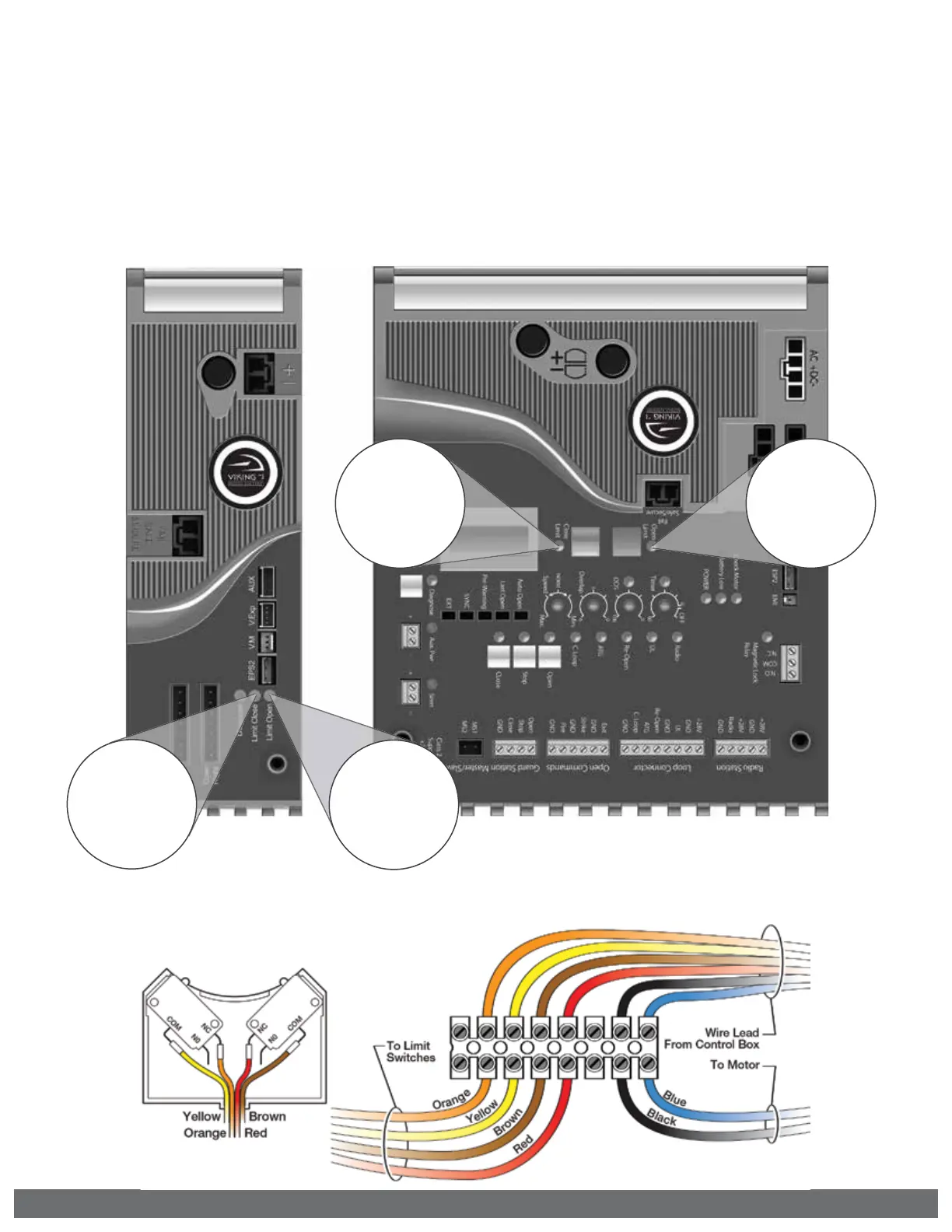
! TECHNICAL TIP: The Limit LEDs will illuminate solid when this operator reaches its
corresponding limit. If both Limit LEDs are illuminated at the same time, this indicates
that there is a problem with the limit switches or wiring.
! IMPORTANT: The gate operator uses mechanical limits. Therefore, the limits cannot be
set electronically by this controller. The Limit Buttons on the control board have been
rendered inactive by the controller. Refer to page 18 for specific instructions on how
to set the limits for this gate operator..
“Open Limit” LED
indicates the gate is
at the open limit.
“Close Limit” LED
indicates the gate is
at the close limit.
“Limit Close” LED
indicates SLAVE is at
the close limit.
“Limit Open” LED
indicates SLAVE is at
the open limit.
Reference Wiring Diagram



 To Next Page