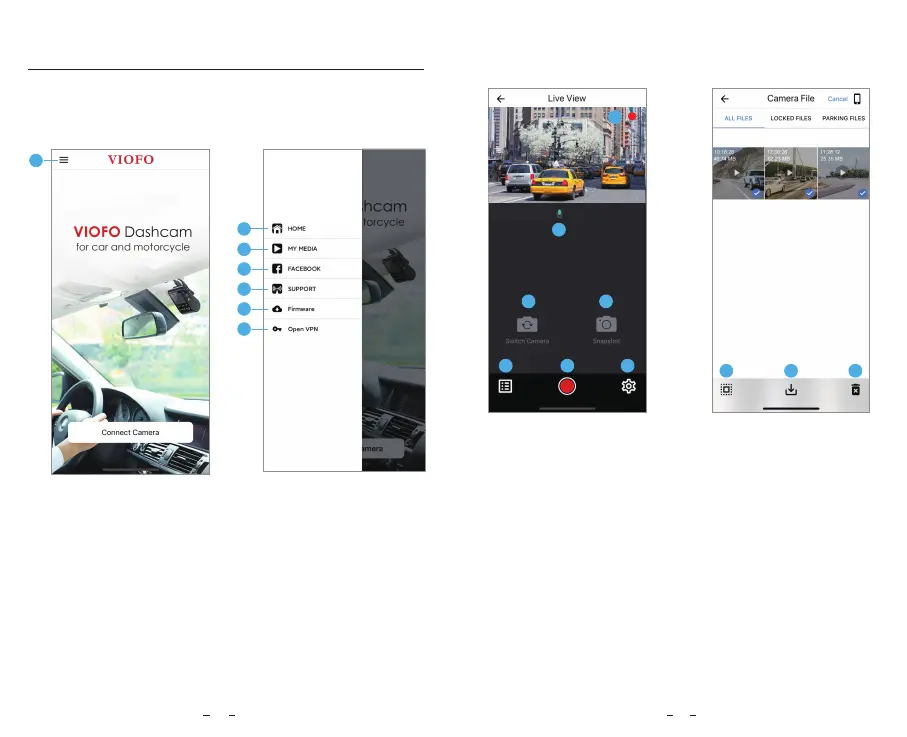
Choosing "Connect your camera" to use your phone to control
the dashcam.
5 - Official Support
6 - Firmware Update
7 - VPN connection
1 - Menu
2 - Home Page
3 - Downloaded Video
4 - VIOFO Official Facebook Page
APP Layout Overview
1 - Live Video
2 - Audio Recording Status
3 - Switch Camera Video
Source (Not Applicable)
4 - Take a Video Snapshot
5 - Go to Video File Lists
6 - Start / Stop Recording
7 - Go to System Settings
8 - Video File Lists
9 - Download Video Files
10 - Delete Video Files
Preview Video
1
2
3
5 6
7
4
8
9
10
1
1
2560x1440P 30fps
2
3
4
5
6
7
18 19
2023/04/06



 To Next Page