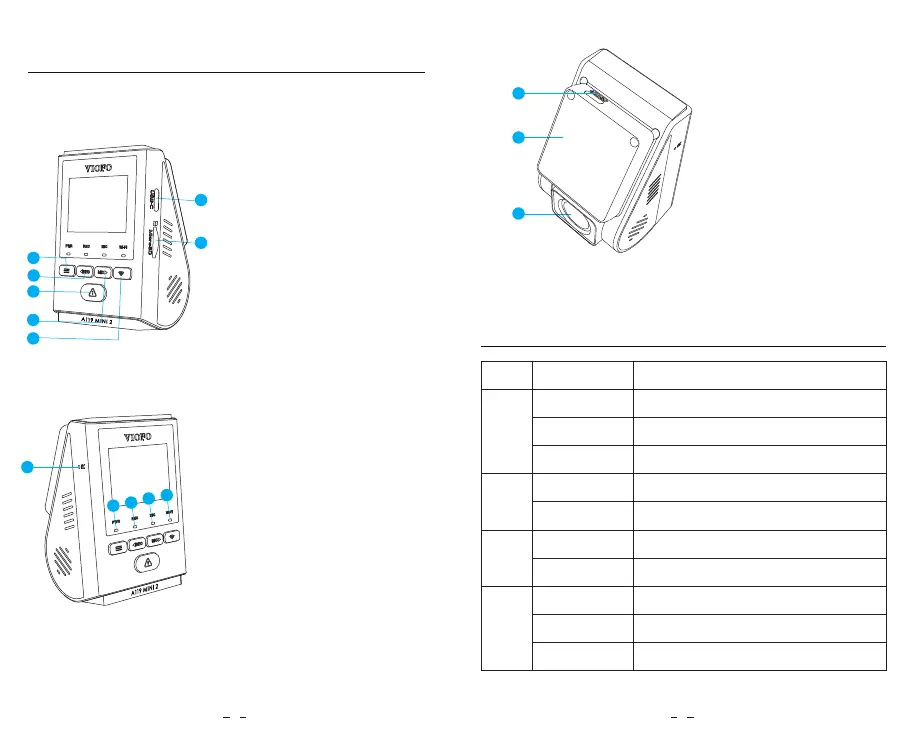
Product Diagram
8
1
2
3
4
5
6
7
12
9
10
11
13
14
15
1. Menu / Power On|Off
2. Menu Up / Recording Start /
Stop
3. Menu Confirm / Video Protect
/ Playback
4. Menu Down / Microphone
Enable / Disable
5. Wi-Fi On|Off
6. Power in / MicroSD Card
Reader Mode
7. Memory Card Slot
8. Reset Button
9. Power Status Indicator
10. Recording Status Indicator
11. Microphone Status Indicator
12. Wi-Fi Status Indicator
13. USB Power Port
14. Mount (GPS Module)
15. Lens
LED Indicators
LED LED Status
Flashing Red
Solid Red
Off
Flashing Red
Solid Red
Solid Blue
Off
Solid Blue
Off
Behavior
Updating Firmware
Power On
Power Off
Recording
Not Recording
Microphone Enabled
Microphone Disabled
Wi-Fi Connected
Wi-Fi Disabled
MIC
Wi-Fi
REC
PWR
Flashing Blue Wi-Fi Enabled and waiting connecting
2 3



 To Next Page