Installation
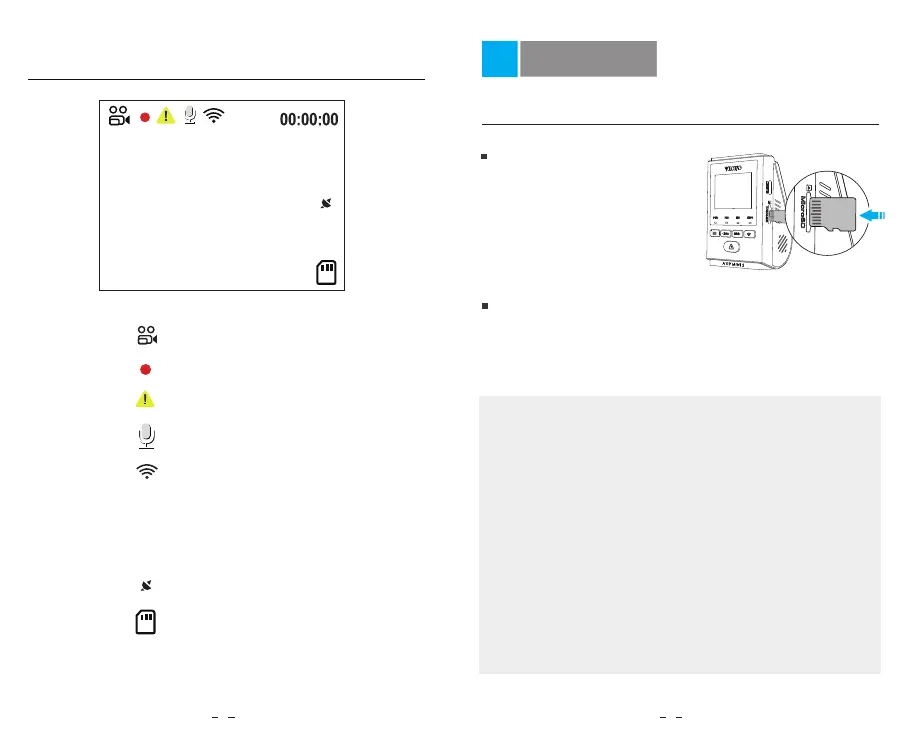
Display Overview
04-06-2023 10:05:00
1440P30
1440P30
00:00:00
Recording Mode
Wi-Fi Status
Recording Time
Video Resolution
Recording Status
GPS Status
Emergency Lock
Microphone
SD Card
Insert / Remove the Memory Card
Insert the memory card
Ensure the camera is turned
off. Hold the memory card in
the orientation shown, slide it
into the card slot until you
hear a click.
Remove the memory card
Note:
Ensure that the camera is turned off, and then push the
edge of the memory card with your fingernail. The card
will spring out far enough to be removed.
• The microSD card is sold separately. The microSD card
must have a Class-10 or UHS-I rating and the capacity is
up to 256GB.
• We recommend you to buy the VIOFO brand memory
cards which are manufactured with top-tier MLC NAND
flash, making them durable and reliable.
• Please format the card on a computer or in the camera
to the exFAT or- FAT32 file system.
• Formatting will permanently erase any data on the
microSD card. For best performance, format periodically
(after backing up any important files).
• Make sure the card label facing the forward (away from
the screen). Ensure the camera is turned off and push the
memory card into the card slot until you hear a click.
6 7



 To Next Page