Installation
Insert / Remove the Memory Card
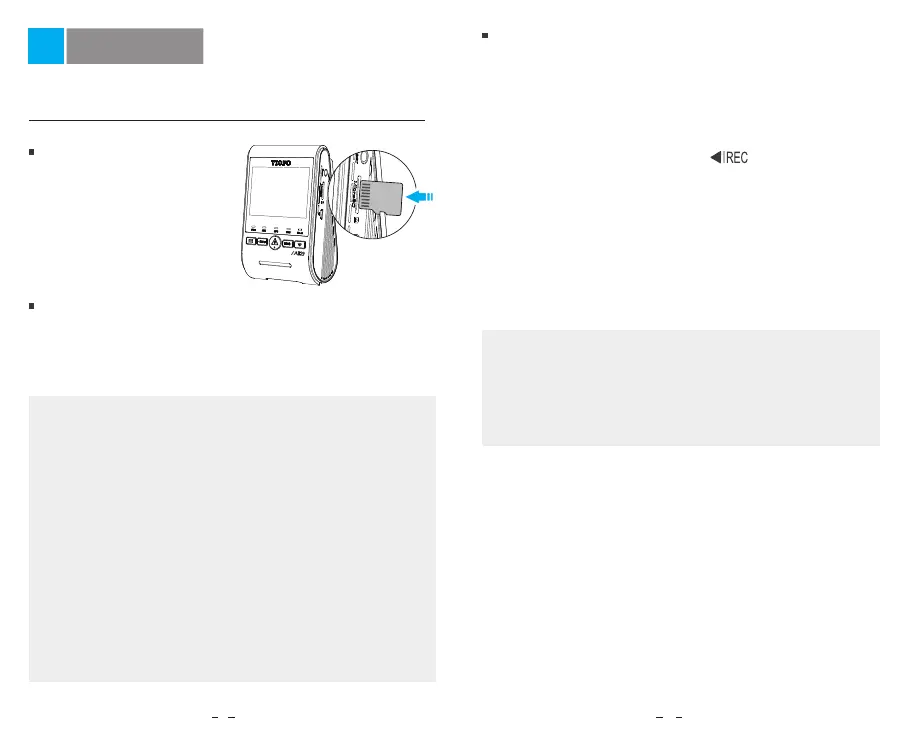
Insert the memory card
Ensure the camera is turned
off. Hold the memory card
in the orientation shown,
slide it into the card slot
until you hear a click.
Remove the memory card
Ensure that the camera is turned off, and then push
the edge of the memory card with your fingernail.
The card will spring out far enough to be removed.
8 9
Note:
• The microSD card is sold separately. The microSD card
must have a high endurance or UHS-I rating and the
capacity is up to 512GB.
• We recommend that you buy VIOFO industrial grade
microSD card for extended endurance, excellent
performance and reliability.
• Memory card must be formatted before first use. Please
format the card on a computer or in the camera to the
exFAT or FAT32 file system.
• Please turn off the A329 before inserting or removing
the microSD card.
• Inserting or removing the microSD card while recording
may destroy the files.
Format the memory card
Memory card must be formatted before first use.
Format the memory card in the camera
Format the memory card using a computer
To format the card in the camera, either use the
VIOFO App and the format option in the Settings,
or alternatively long press the [ ] button.
To format the memory card on your computer, follow
your computer’s user manual.
For deep formatting of the memory card, you can also
download the GUIFormat tool from our official website:
https://viofo.com/download/guiformat.exe
Note:
We suggest formatting the card periodically to ensure
the best performance of the camera.
Formatting the card will erase all data permanently,
please back up important data beforehand.



 To Next Page