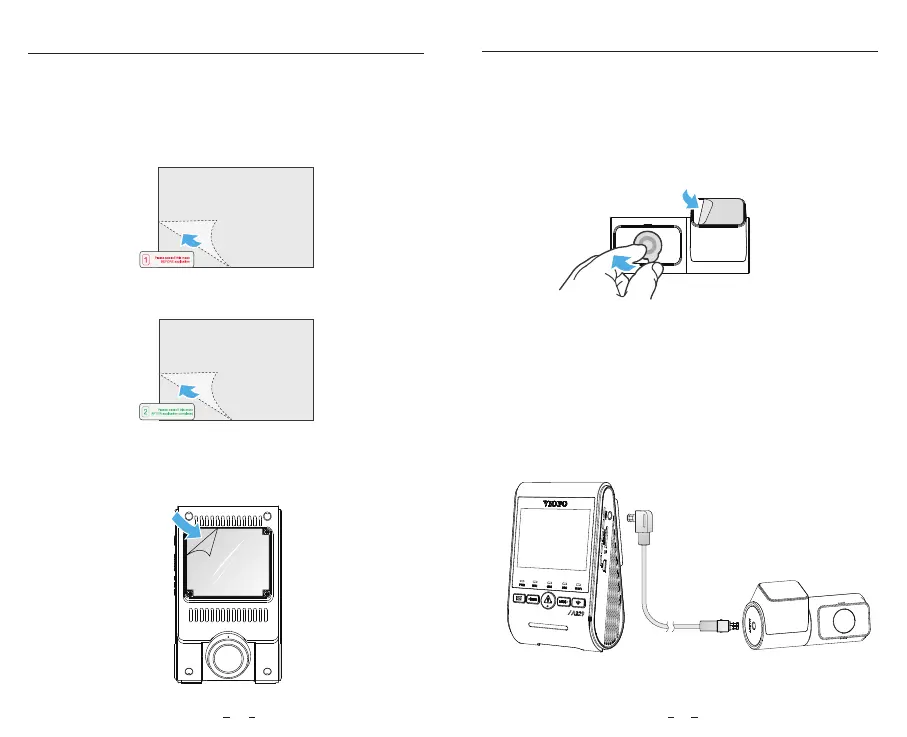
4. Fix the rear camera on the selected location.
3. Peel the protection film off the sticky pad and camera lens.
Install the Rear Camera (Optional)
1. Select an installation location on the windscreen,
without defrost grid wires, and where the camera can
record the entire rear view.
2. Wipe clean the installation surface of the windscreen
with a dry cloth.
3. Peel the green sign protective film off the static sticker.
1. Wipe clean the surface of the windscreen before
installation.
2. Peel the red sign protective film off the static sticker,
then attach the sticker to the windscreen. Press it for a
few seconds, making sure no bubbles are left.
Install the Static Sticker (Optional)
5. Connecting with Rear Camera
Power off the product and connect the rear camera
cable to the front camera (main unit).
Cable routing should be as shown in the following two
diagrams.
4. Peel the protection film off the sticky pad on the mount,
and attach it to the sticker. Press the camera hard for a
few seconds, making sure it is attached firmly.
14 15



 To Next Page