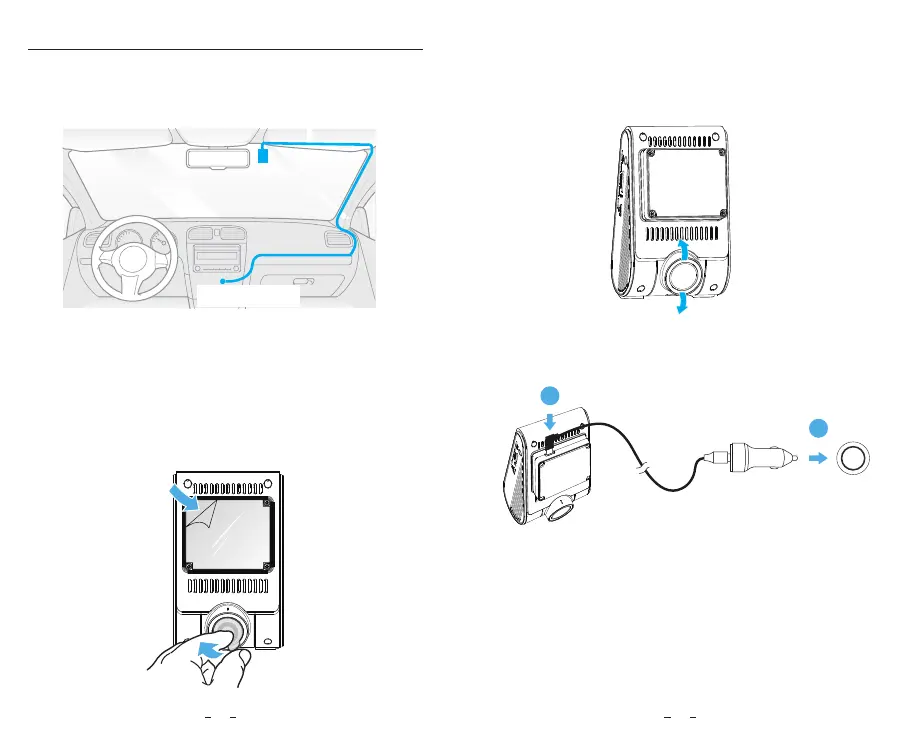
6. Adjust the Lens Angle
- Look at the live view on the LCD.
- Adjust the angle of the lens up / down if necessary.
Install the Front Camera
1. Select a location on the windshield behind the
rear-view mirror where the camera will not obstruct the
driver’s view while driving.
2. Wipe clean the installation surface of the windscreen
with a dry cloth, it must be grease free for the sticky pad
to stick firmly.
3. Mount the dashcam directly to the windshield with the
sticky pad, or attach the static sticker to the selected
location before installation (Refer to guide on page 14).
4. Peel the protection film off the sticky pad and camera
lens.
Best mounting location
Connect to car
cigarette lighter socket
5. Fix the camera on the selected location.
7. Connecting to Power
Insert the car charger USB cable’s male port into the
camera mount's Type-C port. Plug the car charger
adapter into your vehicle’s 12V / 24V female power
socket.
1312
2
1



 To Next Page