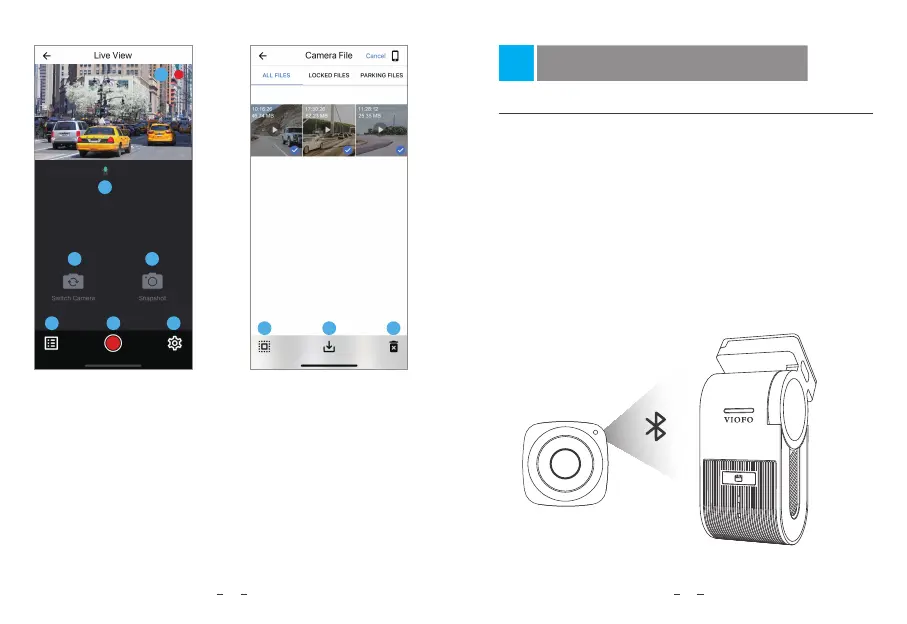
1 - Live Video
2 - Audio Recording Status
3 - Switch Camera Video Source
(Not Applicable)
4 - Take a Video Snapshot
5 - Go to Video File Lists
6 - Start / Stop Recording
7 - Go to System Settings
16
8 - Video File Lists
9 - Download Video Files
10 - Delete Video Files
Preview Video
1
2
3
5 6
7
4
1
2560x1440P 30fps
8
9
10
2023/02/24
17
Install Optional Accessories
Install Bluetooth Remote Control
With the Bluetooth Remote Control (optional) mounted in a
convenient location on your dashboard, you can safely protect
important videos from being overwritten, without needing to take
your eyes off the road. When you press the Bluetooth Remote, the
camera will lock the current video file and take a video snapshot.
Pairing with dash camera
• Make sure the dashcam is working with power supplied.
• Press and hold the button on remote control for 3 seconds to pair
with camera.
• If get paired successfully, the LED indicator of the remote turns blue.


 To Next Page