6
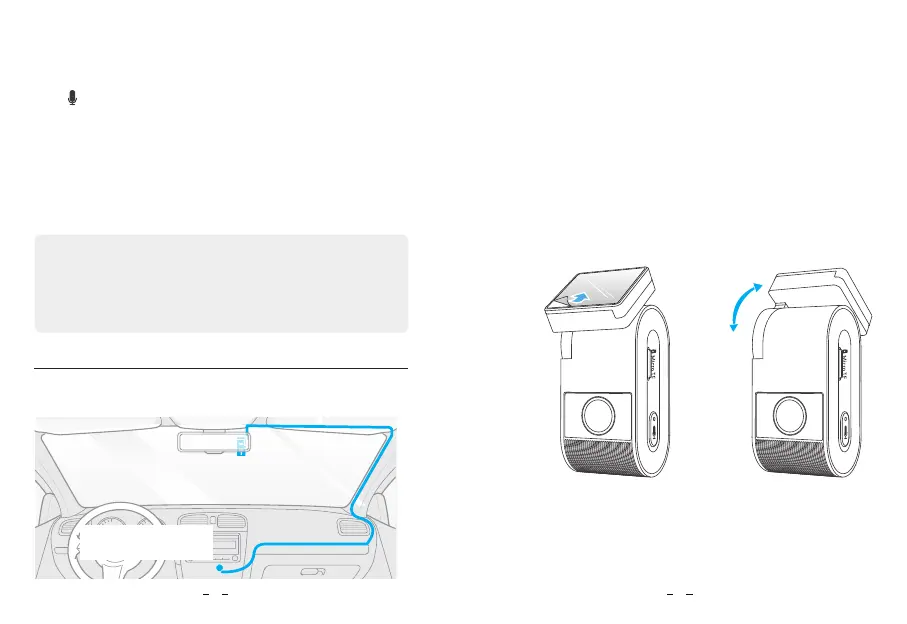
Connect to car
cigarette lighter socket
Best mounting location
2. Install the Dashcam
1. Select a location on the windshield behind the rear-view mirror
where the camera will not obstruct the driver’s view while driving.
Format the memory card in the camera
To format the card in the camera, either use the VIOFO App
and the format option in the Settings, or alternatively long press
the [
] button.
Format the memory card using a computer
To format the memory card on your computer, follow your
computer’s user manual.
For deep formatting of the memory card, you can also download
the GUIFormat tool from our official website:
https://viofo.com/download/guiformat.exe
Note:
We suggest formatting the card periodically to ensure the best
performance of the camera.
Formatting the card will erase all data permanently, please back
up important data beforehand.
2. Wipe clean the installation surface of the windscreen with a dry
cloth, it must be grease free for the sticky pad to stick firmly.
3. Mount the dashcam directly to the windshield with the sticky pad,
or attach the static sticker to the selected location before
installation ( Refer to guide on page 9 ).
4. Peel the protection film off the sticky pad.
5. Fix the camera on the selected location.
6. Adjust the Bracket Angle
Adjust the angle of the bracket up / down according to the needs
of video recording.
(Step 4) (Step 6)
180°
7


 To Next Page