30
© 2006 directed elect r o n i cs—all rights reser ved
➜
auxiliary channels
This system includes four additional auxiliary channel outputs that
can be programmed to control any number of vehicle systems and
aftermarket add-on accessory modules.
Trunk release, power seats, power windows and sunroof, amp racks
and audio/video systems can all be controlled at the touch of a remote
control button.
activate an auxiliary channel
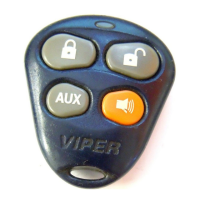
Refer to Remote Control Button Functions section of this guide on
which remote control buttons will activate an auxiliary channel.
a. Channel 2 or Trunk release: Press and hold the
button
for two seconds, the output will activate. The delay is built in so
the trunk can not be accidentally opened.
b. Channel 4, 5 & 6: Press for one second and release the
remote control button combination for the desired auxiliary
channel output, the output will activate.
Each time an auxiliary channel command is sent, the system will
send a response to the remote control as confirmation after the
button on the remote has been released.
“system” The system will activate the desired auxiliary channel
“remote” The remote control Notification will be four beeps
ascending in tone and channel animation for the activated auxil-
iary channel output



 To Next Page