47
© 2006 directed elect r o n i cs—all rights reser ved
➜
page mode on/off
When Page is off, the remote control will not receive Pages or output
Page Notifications or Alerts. It will only receive Command Reponses.
1. Enter programming mode
2. Scroll to highlight OPERATION
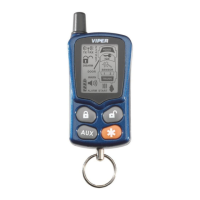
3. Press
to choose the operation menu screen
4. Scroll to highlight PAGE and press
to choose.
5. Scroll to highlight the desired setting.
6. Press
to save and return to the Operation menu or
to save the setting and exit.
➜
beeps on/off
When Beep is off, the remote control will only show animations or
icons for Page Notifications.
1. Enter programming mode
2. Scroll to highlight OPERATION
3. Press the
button to choose the operation menu screen
4. Scroll to highlight BEEP and press
to choose.
5. Scroll to highlight the desired setting.
6. Press
to save and return to the Operation menu or
to save the setting and exit



 To Next Page