DLP Projector—User’s Manual
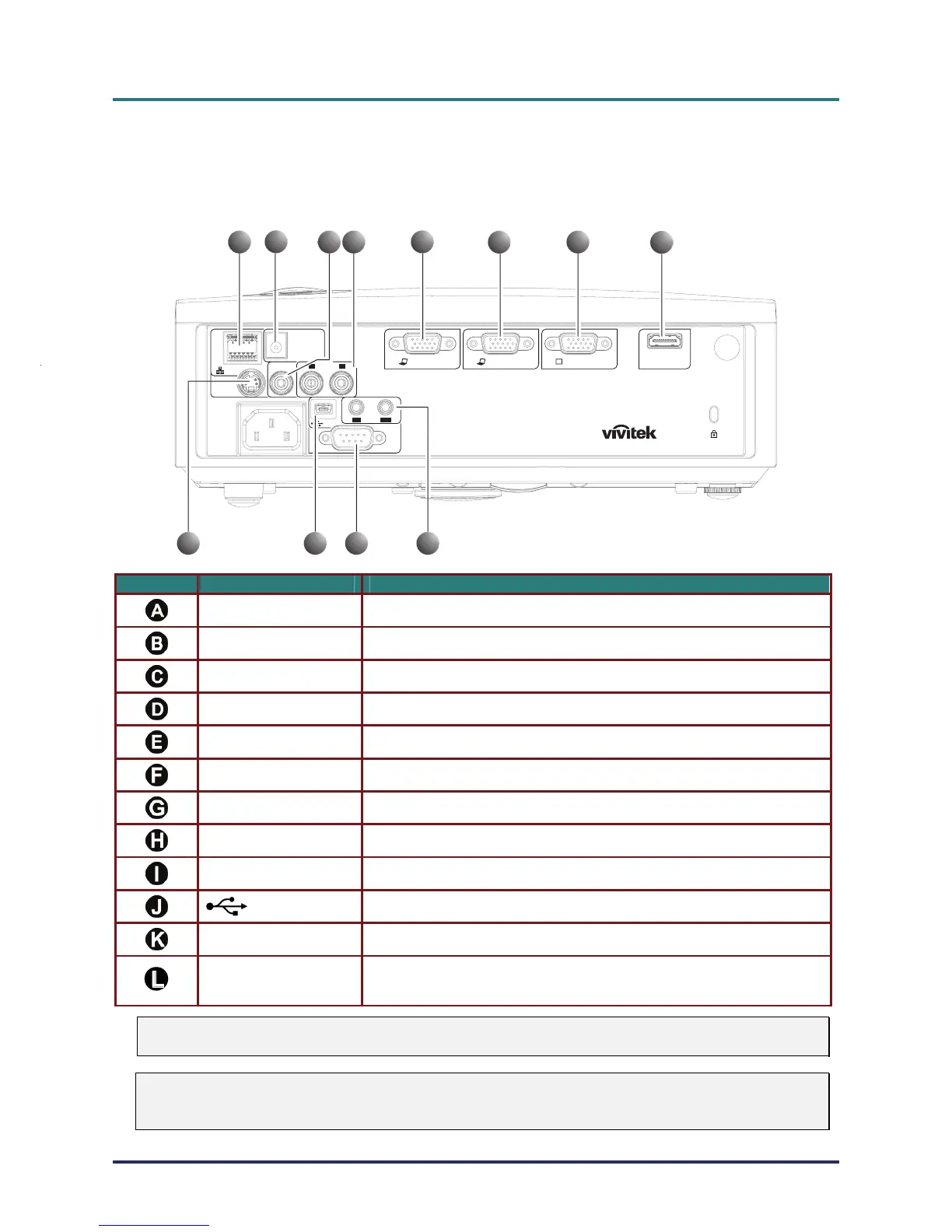
Connecting Input Devices
A PC or notebook computer and video devices can be connected to the projector at the same time. Video
devices include DVD, VCD, and VHS players, as well as movie camcorders and digital still cameras.
Check the user manual of the connecting device to confirm it has the appropriate output connector.
USB
HDMI
S-VIDEO IN
LAN
RS-232C
VIDEO IN AUDIO IN
AUDIO
L
IN
R
OUT
12 V TRIGGER
VGA OUTVGA IN-1VGA IN-2
A
B
C
G
KJ
L
D
H
I
FE
ITEM LABEL DESCRIPTION
LAN (*) Connect a LAN CABLE from Ethernet
DC 12V Connect the 12V OUT
VIDEO IN Connect the COMPOSITE CABLE from a video device
AUDIO IN (L and R) Connect the AUDIO CABLES from a audio device
VGA IN – 2 Connect the RGB CABLE from a computer and components
VGA IN – 1 Connect the RGB CABLE from a computer and components
VGA OUT Connect the RGB CABLE to a display (Loop Thru only for VGA IN-1)
HDMI (*) Connect the HDMI CABLE from a HDMI device
S-VIDEO Connect the S-VIDEO CABLE from a video device
(USB)
Connect the USB CABLE from a computer
RS-232C Connect the RS-232 serial cable for remote control
AUDIO IN
AUDIO OUT
Connect an AUDIO CABLE from the input device
Connect an AUDIO CABLE for audio loop through
Note:
(*) For D837 only
Warning:
As a safety precaution, disconnect all power to the projector and connecting devices before making
connections.
– 10 –



 To Next Page