VIVOTEK
User's Manual - 15
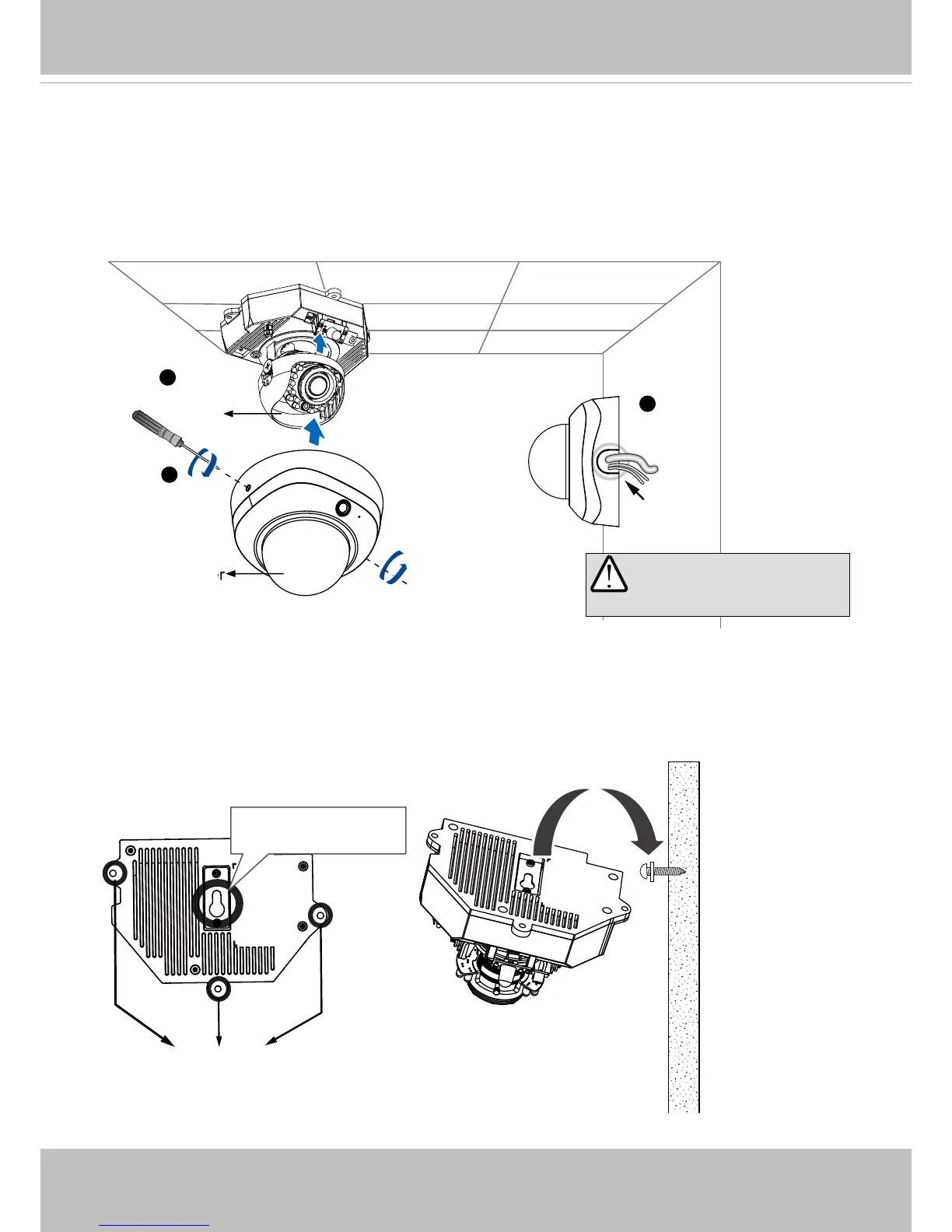
1� Align the notches on the inner side of the black cover with the rivets on the sides of the lens,
and then x the black cover.
2� If you choose to feed the cable through the ceiling/wall, arrange the cables neatly through
the cable hole A (not shown in the drawing)� If you choose to feed the cable from the side, re-
move plate B�
3� Attach the dome cover to the camera as the direction shown below� Tighten two screws from
the sides of the dome cover�
4� Finally, make sure all parts of the camera are securely installed�
1
B
3
2
A
IMPORTANT! Be ware of
the cable route!
Black Cover
Dome Cover
1� When mounting the camera, you can use the key hole slot at the bottom� The key hole slot
helps facilitate installation and a safe mounting� First fasten a pioneer screw to the wall/
ceiling� Mount the camera to the screw�
2� Use a pencil to mark the locations of the 3 permanent mounting holes�
3� When cabling and the initial adjustment is done, mount the camera by fastening screws to the
3 mounting holes�
Mounting Holes
Key Hole Slot
Pioneer Screw



 To Next Page