94 Ring Tone
Ring Tone
To select a distinctive ring tone for a station:
1. Dial the Ring Tone program code [695] on the dial pad. The
following message displays:
2. Enter a valid tone number. The speaker will sound a steady tone
that correlates to the 2-digit entry. The 2-digit tone number will
displays in the lower left corner of the LCD.
The ringing choices are as follows:
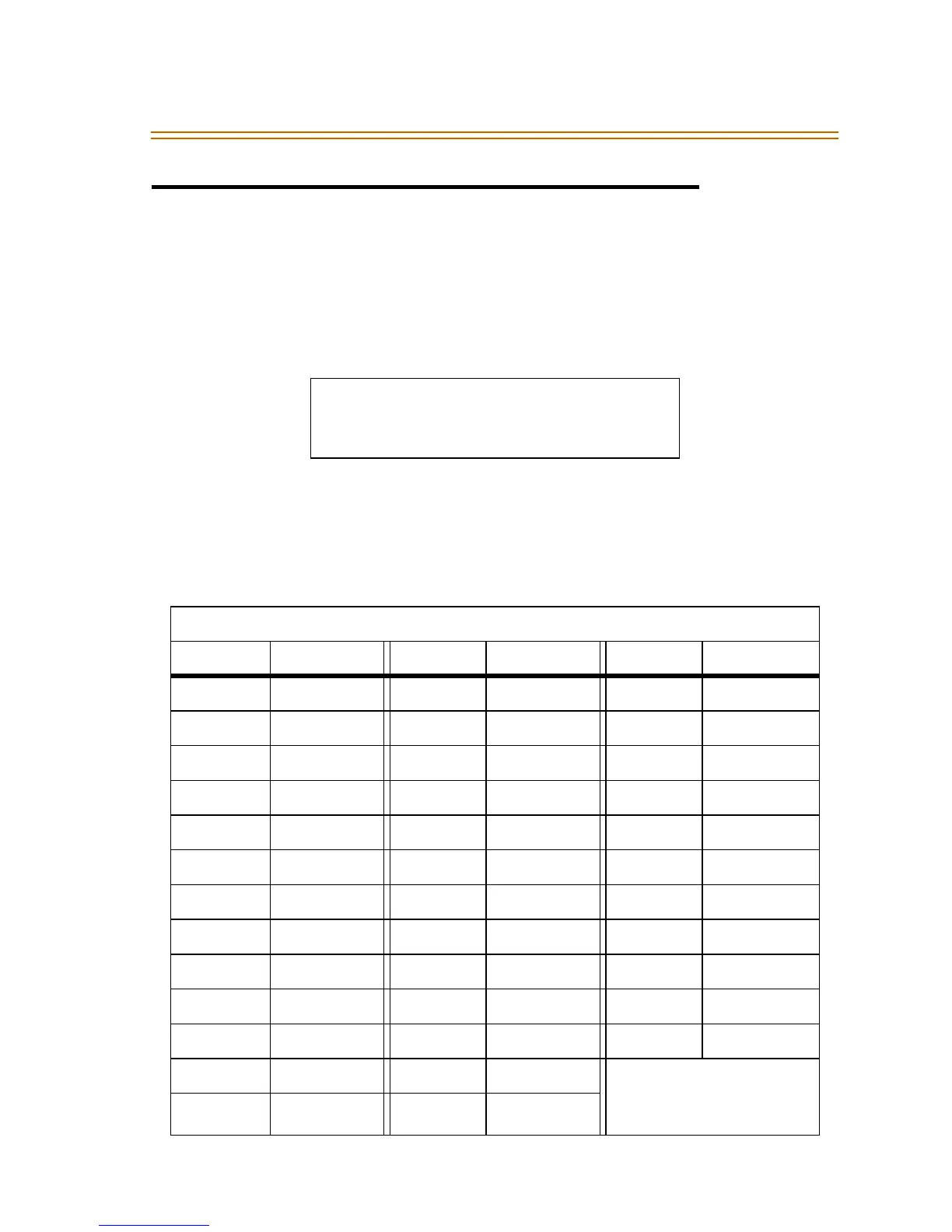
ENTER RING TONES 00-36
XX PRESS SPEED TO SAVE
CO RING TONE*/FREQUENCY
Tone (#) Freq Tone (#) Freq Tone (#) Freq
00 697/770 13 770/1633 26 1209/1336
01 697/852 14 770/0 27 1209/1477
02 697/941 15 852/941 28 1209/1633
03 697/1209 16 852/1209 29 1209/0
04 697/1336 17 852/1336 30 1336/1477
05 697/1477 18 852/1477 31 1336/1633
06 697/1633 19 852/1633 32 1336/0
07 697/0 20 852/0 33 1477/1633
08 770/852 21 941/1209 34 1477/0
09 770/941 22 941/1336 35 1633/0
10 770/1209 23 941/1477 36 OFF
11 770/1336 24 941/1633
Tone Duration* =
50 ms/50 ms
12 770/1477 25 941/0


 To Next Page