DATA FILER
Refer to the buttons in the SOURCE and MODE sections for selection of the unit and the type
of file required.
You can now use the [PAGE] buttons and function keys to select the file for which you wish to
display the information; pressing the [ESC] key will abort the operation.
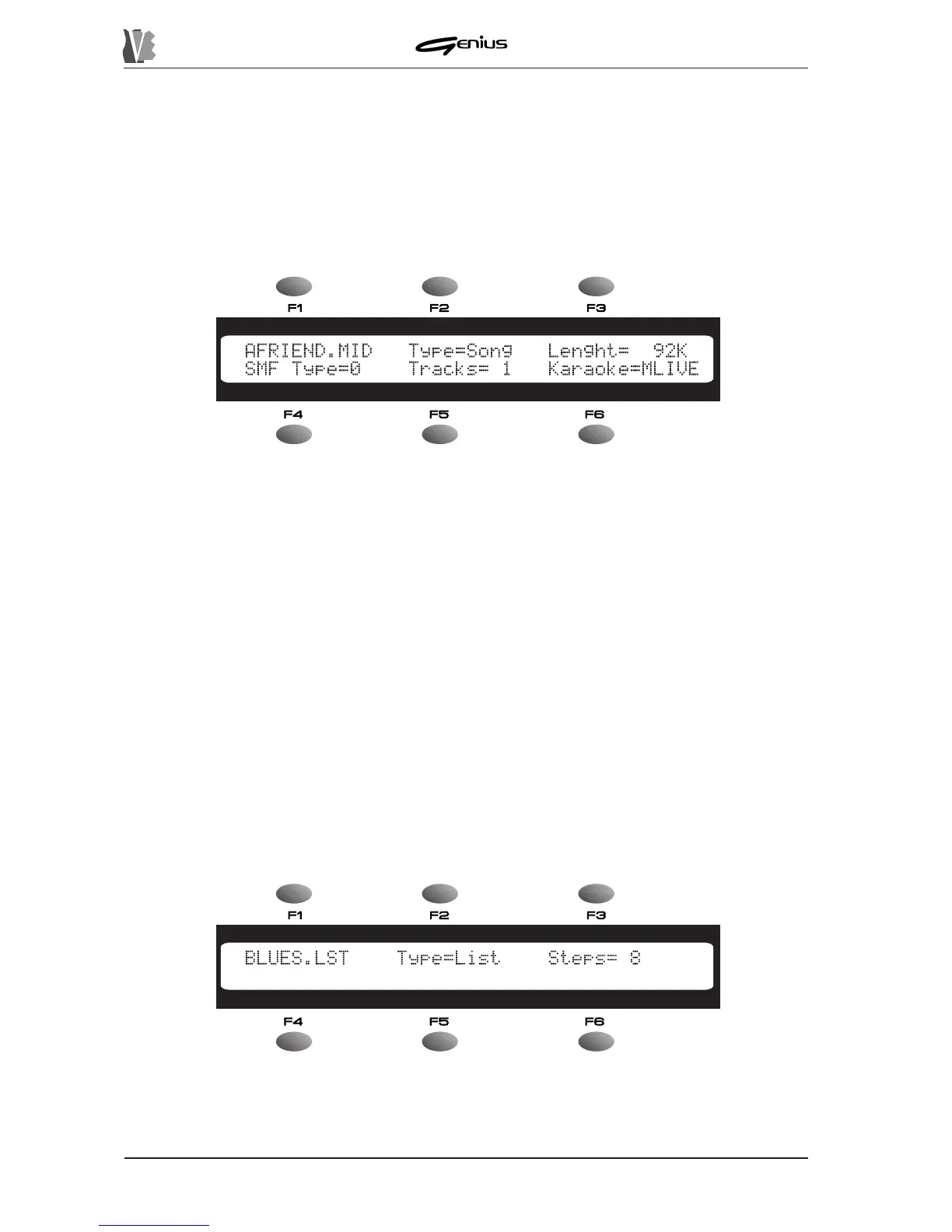
The information displayed varies depending on the type of file selected. If you have selected
a song, the display will show:
The fields on the display are the following:
o The first field, next to the [F1] function key, displays the name of the file.
o
Type
: displays the file type, i.e. whether it is a song (
Type=Song
) or a List
(
Type=List
).
o
Length
: indicates the size of the selected file in KBytes.
o
SMF Type
: indicates about the format of the SMF (whether type 0 or type 1).
o
Tracks
: displays the number of tracks the file contains.
o
Karaoke
: indicates the type of Karaoke, using the following codes:
TUNE
: TUNE 1000®
GEM
: GENERALMUSIC®
SOLT
: SOLTON®
MLIVE
: M-LIVE®
YAMA
: YAMAHA®
NONE
: lyrics information not present or not recognised.
If the file is a List, on the other hand, the display will show:
Containing the following fields:
o The first field, next to the [F1] function key, displays the name of the file.
142


 To Next Page