DATA FILER
8.3 MIDI FUNCTIONS
The MIDI function of the TOOLS section, which can be activated using the key of the same
name, allows you to set up all the instrument’s MIDI parameter, such as the output Router,
input and/or output MIDI filters, synchronisation setting, etc..
Note that the settings made in this section affect the correct playback of the songs, even if
they are reproduced exclusively by the internal sound generator.
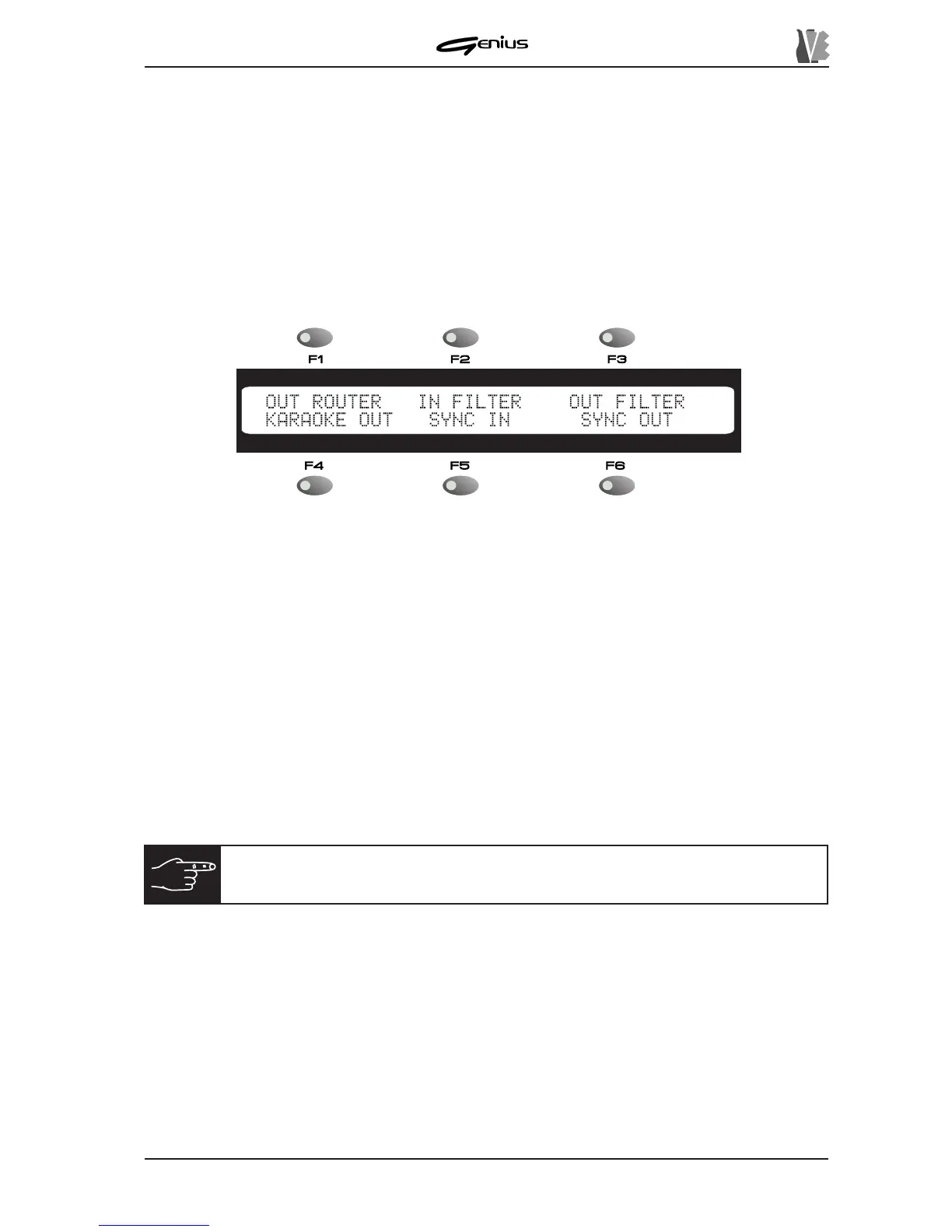
Once the [MIDI] key has been pressed, the display will show the video page:
containing the following direct selection fields:
o
OUT ROUTER
: selectable by means of the [F1] function key – sets the track (MIDI channel)
to which the MIDI data generated by the song being played are to be directed.
o
IN FILTER
: [F2] – sets the MIDI fitler for the data entering the instrument on the MIDI IN
port connected to the [JOY PORT].
o
OUT FILTER
: [F3] – sets the MIDI filters for the data addressed to the internal sound
generator and/or the MIDI OUT port.
o
KARAOKE OUT
: [F4] – defines whether or not the MIDI data relating to the Karaoke are
to be sent to the [MIDI OUT] port.
o
SYNC IN
: [F5] – defines which synchronisation messages received at the MIDI IN port
are to be interpreted by the instrument.
o
SYNC OUT
: [F6] – sets which synchronisation messages are to be sent to the [MIDI
OUT] port.
8.3.1 OUT ROUTER
The OUT ROUTER function allows you to specify whether the data relating to each track
(corresponding to its own MIDI channel) are to be sent to the internal sound generator, to the
MIDI OUT port, or to both.
From the MIDI section main menu, illustrated previously, use the [F1] function key to select the
OUT ROUTER function.
N.B.:
every modification made to the parameters relating to this section will
be saved automatically inside the operating system.
145


 To Next Page