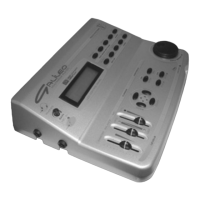
DATA FILER
101
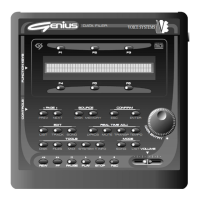
3. PAGE section: this section contains the buttons used for displaying the display pages
when more than one page is present. When a button is active, its LED will be constantly on.
o [PREV.]: selects the page before the one currently shown on the display.
o [NEXT]: selects the next page.
4. EDIT section: this group of buttons enables the modifications which can be saved on the
selected file.
o [LIST]: allows the creation/modification of Lists.
o [TRACK]: enables the function for modification of single tracks of the song.
o [SONG]: enables the function for modification of the song’s general parameters
(Transposer, Tempo, etc...).
5. TOOLS section: section containing the buttons used to activate the instrument’s utility
functions, including:
o [DISK]: recalls the functions for management of the mass memory (internal memory
and floppy disk). The functions present in this section include formatting, File Sort,
disk copy, etc...
o [FILES]: recalls the functions for management of the files present in the internal memory
or on the floppy disk (copy, delete, rename, etc...).
o [MIDI]: management of the MIDI functions and ports.
o [SYSTEM]: recalls the instrument’s general set-up functions.
o [T.INFO]: displays the main parameters of the tracks contained in the song being
performed.
6. CONFIRM section: these buttons are used to confirm or abort the procedure when the
system requests this.
o [ESC]: abort.
o [ENTER]: confirm.
7. REAL TIME ADJ. section: the buttons in this section allow the user to make real-time
modifications to the song being performed; these changes cannot be memorised.
o [LYRICS]: enables display of the lyrics of the song (the key is not active if the song
does not contain text information).
o [MUTE]: disables playback of one or more tracks.
o [TRANSP.]: activates the transposition of songs to different keys.
o [TEMPO]: varies the metronome tempo for playback.
To set up each of the functions referred to above, press the relative button and keep it pressed.
8. Encoder [DATA ENTRY]: dynamic encoder for file selection or for modifying the values of
the selected parameters.
9. MODE section: these buttons can be used to select the type of file required for playback.
o [SONG]: for the selection of the individual songs (*.MID files).
o [LIST]: for the selection of Lists (pre-arranged sequences of songs).


 To Next Page