10
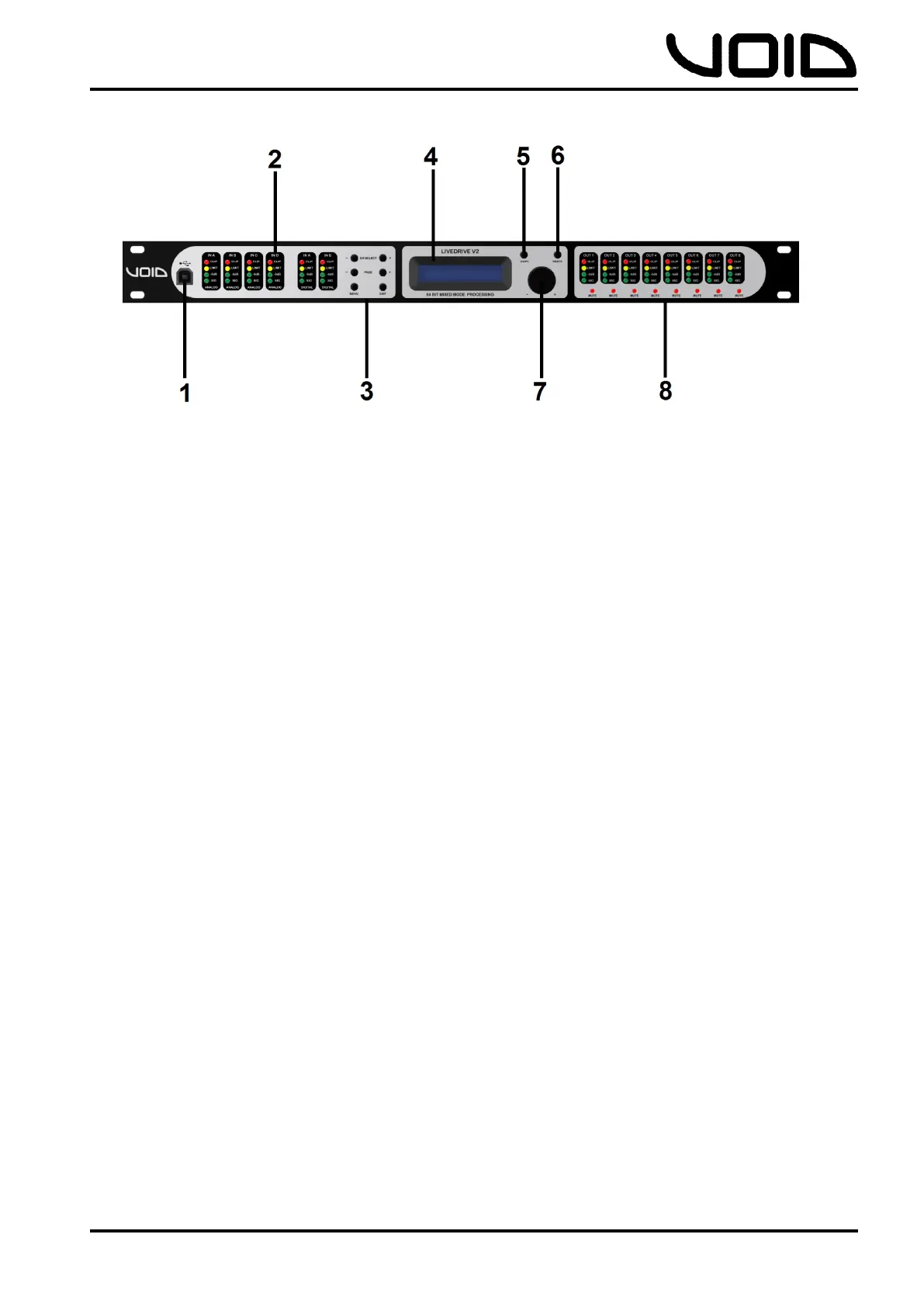
3.0 Front Panel
1. USB Port – standard Type-B female socket.
2. Peak Level LED – shows the current peak of the signal: SIG, -6dB, Limit,
Clip. Input’s Limit = Max. Headroom. Output Limit = threshold of limiter.
3. Menu & Control Keys –
CH SELECT
- Previous channel
+ Next channel
PAGE
-
Previous page
+ Next page
MENU System information
EXIT Return to main menu, backspace
4. LCD – Displays information about the unit
5. COPY - *WILL BE AVAILABLE IN A FIRMWARE UPDATE*
6. PASTE - *WILL BE AVAILABLE IN A FIRMWARE UPDATE*
7. Control Wheel – gives velocity sensitive control over parameter values.
There is also a button click to allow changing parameters.
8. Mute – mutes/un-mutes the corresponding output channel. When a channel is
muted, a red LED will light up.


 To Next Page