32
e) Capacity measuring
Make sure that all the circuit parts, switches and components and other objec-
ts of measurement are disconnected from the voltage and discharged.
With electrolyte capacitors, observe the polarity under all circumstances!
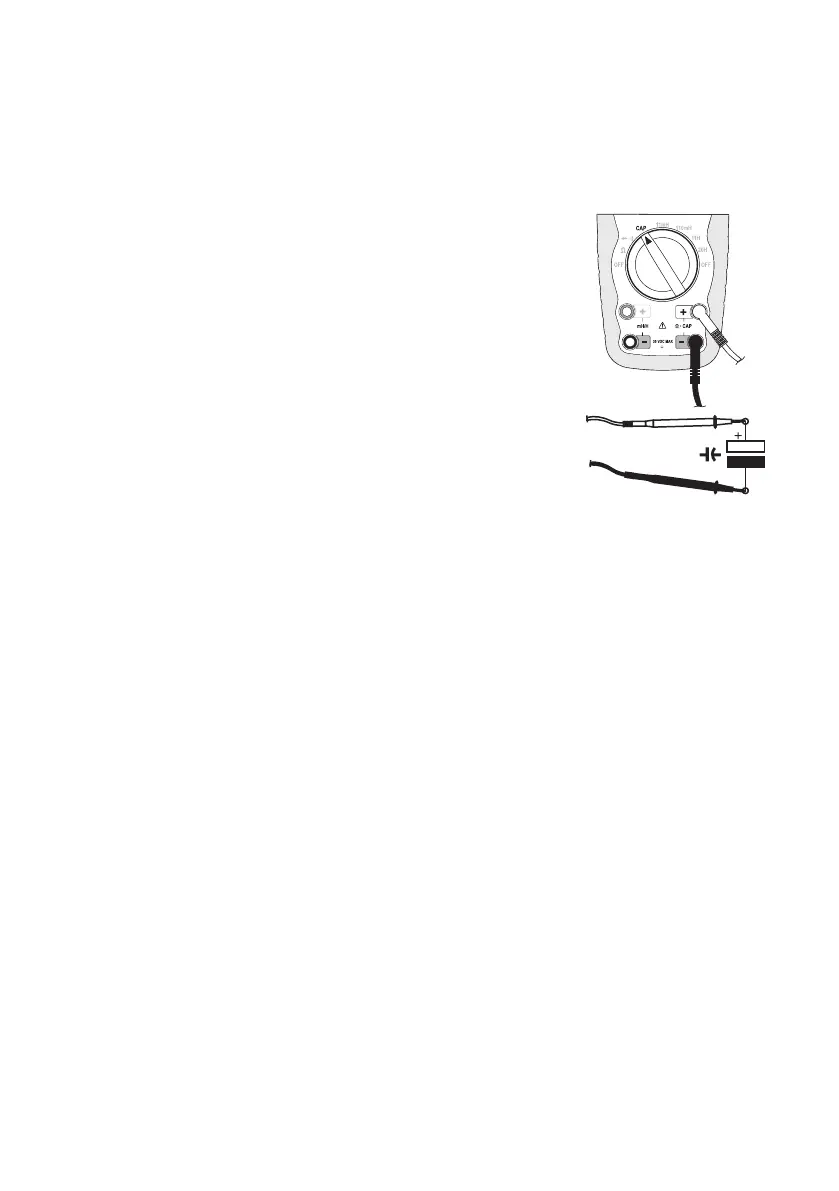
- Turn the DMM on and select measuring range “CAP”
- Plug the red measuring lead into the CAP measuring socket “+” (9)
and the black measuring lead into the CAP measuring socket.”-” (8).
- The display shows the unit “nF”.
☞
Due to the sensitive measuring input, the display may
show a value in case of “open” measuring leads. This
does not impair the measuring accuracy.
- Now connect the two test prods (red = positive pole/black = negative
pole) with the object to be measured (condenser). After a short while
the display shows the capacity. Wait until the display has stabilised.
With capacities of >40 µF, this may take a few seconds.
- If the capacitor was not completely discharged, the display shows
“dSC”. An integrated discharge circuit slowly discharges the compo-
nent. Discharge the capacitor manually or wait until this display dis-
appears and the measuring value is indicated.
- As soon as „OL“ (overload) appears on the display, you have exceeded the measuring range.
- After measuring, remove the measuring leads from the measuring object and turn the DMM off.


 To Next Page
 Loading...