EasyManua.ls Logo

Voltronic Power 10KW - User Manual

Voltronic Power 10KW
53 pages
Print Icon
To Next Page IconTo Next Page
Loading...
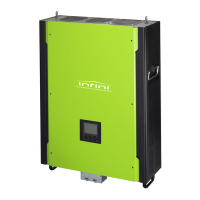
Hybrid 10KW PV Inverter
Version: 1.2
User Manual

Questions and Answers

  • D
    Danielle HumphreySep 6, 2025
    What to do if Voltronic Power 10KW displays INV short?
    • P
      Patrick RamirezSep 6, 2025
      If your Voltronic Power Inverter displays an INV short error, the output is likely short-circuited. Check if the wiring is properly connected and remove any abnormal loads.
  • S
    Sean CastroAug 22, 2025
    What to do if my Voltronic Power Inverter shows an overload?
    • L
      lopezjosephAug 22, 2025
      If your Voltronic Power Inverter is overloaded (more than 110% load for too long), try reducing the load by switching off some equipment.
  • K
    Kimberly PowellSep 3, 2025
    What to do if Voltronic Power 10KW displays battery high voltage fault?
    • C
      clayalanSep 3, 2025
      If your Voltronic Power Inverter displays a 'Battery high voltage fault', it means the battery voltage exceeds the limit. Check the battery voltage. If the error persists, please contact your installer.
  • J
    Joshua WebsterSep 2, 2025
    What to do if Voltronic Power 10KW Inverter displays INV DC voltage over?
    • M
      mcoxSep 2, 2025
      If your Voltronic Power Inverter displays an 'INV DC voltage over' error, it may be due to load fluctuations. Restart the inverter. If the error persists, please contact your installer.
  • L
    Luke GainesSep 1, 2025
    What to do if Voltronic Power 10KW displays INV DC current over?
    • K
      Kim PerrySep 1, 2025
      If your Voltronic Power Inverter displays an 'INV DC current over' error, it could be caused by utility fluctuations. Restart the inverter. If the error persists, please contact your installer.
  • P
    pnicholsAug 30, 2025
    What to do if Voltronic Power 10KW Inverter shows BUS voltage under?
    • W
      William HamiltonAug 30, 2025
      If your Voltronic Power Inverter displays a 'BUS voltage under' error, it might be because the PV or battery disconnected suddenly. Restart the inverter. If the error message still appears, please contact your installer.
  • A
    Allen MaxwellAug 29, 2025
    What to do if Voltronic Power 10KW shows INV over current?
    • R
      Rachel BruceAug 29, 2025
      If your Voltronic Power Inverter displays an 'INV over current' error, it could be due to a surge. Try restarting the inverter. If the error persists, please contact your installer.
  • B
    Bethany CarsonAug 27, 2025
    What to do if Voltronic Power Inverter shows solar over current?
    • X
      xpowellAug 28, 2025
      If your Voltronic Power Inverter displays a solar over current error, it could be due to a surge. Try restarting the inverter. If the error persists, please contact your installer.
  • E
    Elizabeth KaneAug 27, 2025
    What to do if Voltronic Power 10KW Inverter shows bus voltage over?
    • B
      Brandon BennettAug 27, 2025
      If your Voltronic Power Inverter displays a 'Bus voltage over' error, it could be due to a surge. Try restarting the inverter. If the error persists, please contact your installer.
  • C
    Chad StrongAug 25, 2025
    What to do if Voltronic Power 10KW Inverter has GFCI fault?
    • D
      Dale SnyderAug 25, 2025
      If your Voltronic Power Inverter is showing a GFCI fault, it indicates that the leakage current exceeds the limit. Check the wiring and panels for any potential leakage. If the problem continues, please contact your installer.

Summary

Important Safety Warnings

General Safety Precautions

Provides general precautions and warnings related to inverter operation and safety.

Installation Procedures

Selecting the Mounting Location

Provides guidelines for choosing an appropriate and safe location for inverter installation.

Mounting the Inverter Unit

Details the process and safety precautions for securely mounting the inverter.

Grid (Utility) Connection

Grid Connection Preparation

Outlines essential preparation steps and cable requirements for connecting to the grid.

Connecting to the AC Utility

Step-by-step guide for making the physical connection to the AC utility power source.

PV Module (DC) Connection

PV Input Voltage and Current Checks

Verifies PV array voltage and current against inverter specifications before connection.

PV Connection Polarity and Finalization

Ensures correct polarity of PV cables and final connection to inverter terminals.

Battery Connection

Battery Voltage Check

Verifies the nominal battery voltage to ensure compatibility with the inverter.

Connecting Battery Terminals

Guides the user on connecting battery cables to the correct terminals, observing polarity.

Load (AC Output) Connection

AC Output Connection Preparation

Outlines preparation steps and cable requirements for connecting the load to the inverter.

Connecting to the AC Output Socket

Step-by-step guide for connecting the load socket to the inverter's AC output terminals.

AC Output Polarity and Finalization

Ensures correct polarity of AC output cables and final connection, with warnings against misconnection.

Commissioning Procedures

Pre-Commissioning Checks

Lists essential checks to ensure correct installation and readiness before commissioning the inverter.

Inverter Power-Up Sequence

Details the correct order for switching on breakers and the inverter for initial operation.

Initial Setup and Operation Modes

Configuring Operation Modes

Covers the selection and detailed setup of various inverter operation modes like Grid-tie, Off-Grid.

Operation and Interface

Inverter Interface and Buttons

Details the inverter's display panel and the functions of its four operating buttons.

Charging Management

Maintenance and Cleaning

Troubleshooting

Warning List and Codes

Lists defined warning situations, their icons, and descriptions for diagnosing issues.

Fault Reference Codes and Solutions

Provides a reference for fault codes, their possible causes, and suggested solutions.

Technical Specifications

Voltronic Power 10KW Specifications

General IconGeneral
ModelVoltronic Power 10KW
Power Rating10KW
WaveformPure Sine Wave
Storage Temperature-15°C to 60°C
Rated Power10KW
DC Voltage48VDC
AC Voltage230V
Output Frequency50/60Hz
Battery Voltage48V
ProtectionOverload, Over Temperature, Short Circuit
Humidity5% to 95% (Non-Condensing)
CoolingForced Air Cooling

Related product manuals