CLIMATE
* Option/accessory.
229
Starting/stopping preconditioning*
Preconditioning warms the passenger compart-
ment and engine or airs the passenger compart-
ment before driving. The function can use direct
start from the centre display or a mobile phone.
Starting/stopping from the centre
display
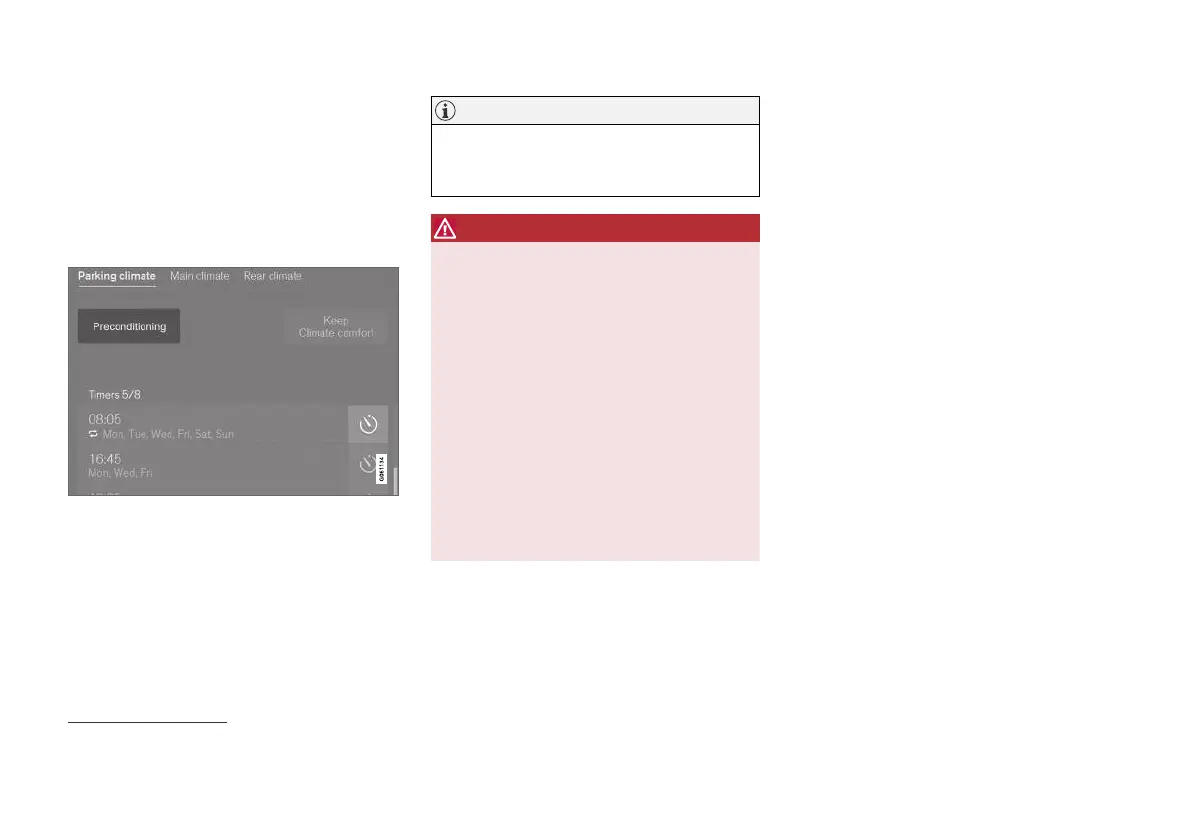
Preconditioning button in the Parking climate tab in
the climate view.
1. Open the climate view in the centre display.
2.
Select the
Parking climate tab.
3.
Press
Preconditioning.
> Preconditioning is started/switched off
and the button is illuminated/extin-
guished.
NOTE
The car's doors and windows should be
closed during the preconditioning of the pas-
senger compartment.
WARNING
Do not use preconditioning if the car is equip-
ped with a heater*:
•
In unventilated spaces indoors. Exhaust
gases are emitted if the heater starts.
•
In locations with combustible or flamma-
ble material nearby. Fuel, gas, long grass,
sawdust, etc. may ignite.
•
When there is a risk that the heater’s
exhaust line may be blocked. For exam-
ple, deep snow inside the front right-hand
wheel housing can obstruct the heater’s
ventilation.
Remember that the preconditioning can be
started by a timer that has been set for a long
time in advance.
Starting from the app*
Start of preconditioning and information about
the selected settings can be managed from a
device that has the Volvo On Call* app. Precondi-
tioning heats the passenger compartment to a
comfortable temperature or ventilates the pas-
senger compartment by blowing in air from out-
side.
The passenger compartment can also be precon-
ditioned with the car remote start function
(Engine Remote Start - ERS)
6
via the Volvo On
Call* app.
Related information
•
Parking climate* (p. 228)
•
Preconditioning* (p. 228)
•
Preconditioning time setting* (p. 230)
6
Certain markets.


 To Next Page