DRIVER SUPPORT
}}
* Option/accessory.
415
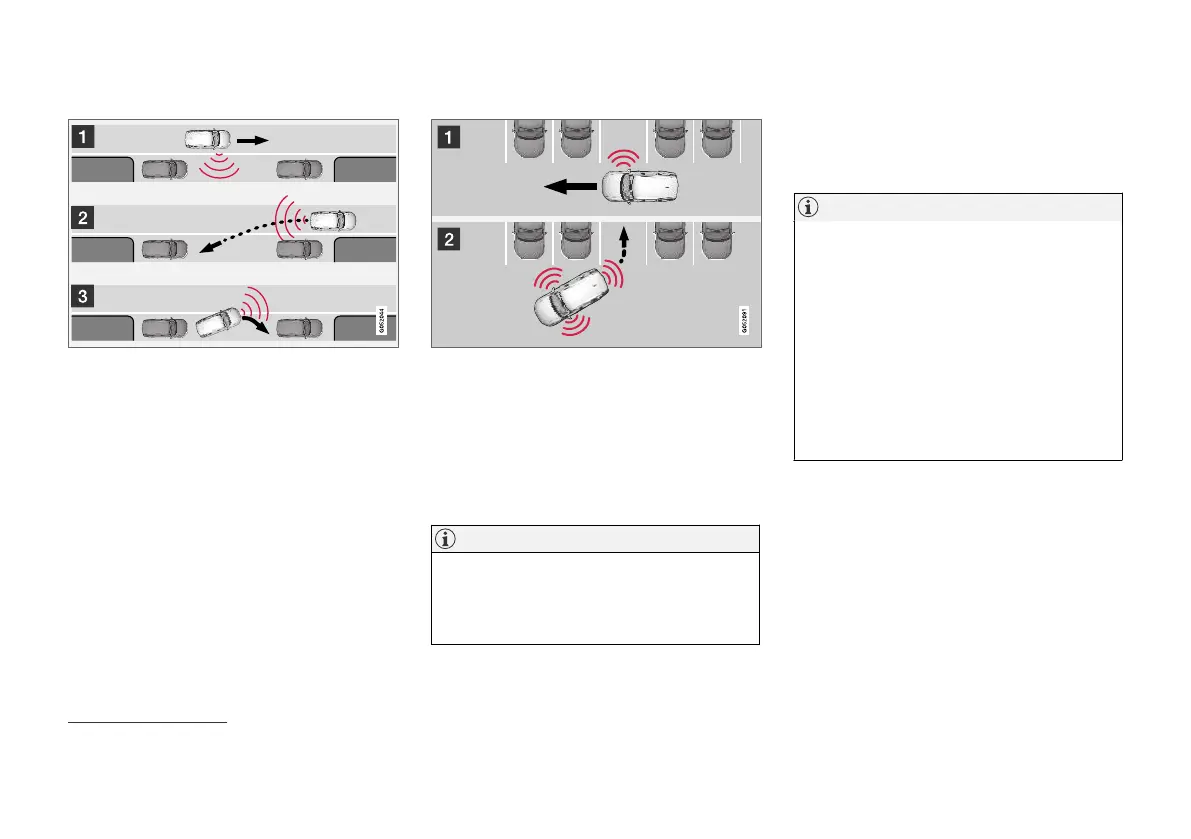
Parallel parking
The principal of parallel parking.
The PAP function parks the car using the follow-
ing steps:
1. A parking space is identified and measured.
2. The car is reversed into the space.
3. The car is positioned in the space by means
of driving forward/backward.
Using the
Park Out function, a parallel-parked
car can also be assisted by PAP to leave the
parking space - see the heading "Leaving a park-
ing space" in the section "Parking with Park
Assist Pilot".
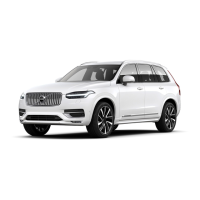
Perpendicular parking
Principle for perpendicular parking.
The PAP function parks the car using the follow-
ing steps:
1. A parking space is identified and measured.
2. The car is reversed into the space and then
positioned in the space by means of driving
forward/backward.
NOTE
A perpendicular-parked car cannot be assis-
ted by the PAP
Park Out function to leave a
parking space - the function must only be
used for a parallel-parked car.
Related information
•
Park Assist Pilot* (p. 414)
Parking with Park Assist Pilot
Park Assist Pilot (PAP
125
) helps the driver park
via three steps. The function can also help the
driver to leave a parking space.
NOTE
The PAP function measures the space and
steers the car - the driver's task is to:
•
keep a close watch around the car
•
follow the instructions in the centre dis-
play
•
select gear (reverse/forward) - a "ping"
sound indicates when the driver should
change gear
•
control and maintain a safe speed
•
brake and stop.
Symbols, graphics and/or text appear on the cen-
tre display's screen when the different steps are
to be performed.
PAP can be activated if the following criteria are
met once the engine has been started:
•
No trailer is attached to the car
•
Speed must be lower than 30 km/h
(20 mph).
125
Park Assist Pilot


 To Next Page